Tutorly: Peer Tutoring for UofT Students.
A four-phase HCI research project (CSCC10, Summer 2024) by a team of six University of Toronto students. The output is a high-fidelity mobile prototype for peer-to-peer tutoring grounded in five cited studies on peer tutoring efficacy, student mental health, and online versus in-person learning. The work covers low-fidelity exploration, a 30-response survey plus two unstructured interviews, a high-fidelity Figma prototype, and a 13-participant asynchronous usability study evaluated against Nielsen's 10 heuristics with emphasis on H1 (visibility), H3 (user control), and H6 (recognition).
6
student team
30
survey responses
13
usability participants
3
tasks evaluated
Skills used
chapter 01 —
Abstract.
This paper summarizes the design process and methodology behind Tutorly, a peer-to-peer tutoring platform aimed at enhancing academic support and student well-being for University of Toronto students. The team followed a four-phase HCI process: a low-fidelity exploration phase (personas, scenarios, hierarchical task analyses), a requirements-gathering phase (a 30-response survey distributed on r/UTSC and r/UTM plus two unstructured interviews with non-CS students), a high-fidelity Figma prototype, and a remote asynchronous usability study with 13 participants. The work is grounded in five cited studies covering peer tutoring efficacy, student mental health, online versus in-person learning, and post-graduate career readiness. Findings are reported below, organized by the three core tasks evaluated: searching and requesting a tutor, signup and onboarding, and joining a peer tutor session.
chapter 02 —
Problem statement.
The team started from a shared observation that their campus had a declining social life and that the decline was tangled up with academic struggle, a pattern the literature backs up (Moghimi et al., 2023; Collier, 2021). Peer tutoring kept showing up in the research as one of the few interventions that addresses both at once: it improves academic performance regardless of competence or time spent (Bowman-Perrott et al., 2013) and is just as effective online as in person (Gehreke et al., 2024). The two problems, an inactive social life and poor academics, were treated as one design problem: build a tool that makes peer tutoring easy to start, safe to participate in, and structured enough that students stick with it.
chapter 03 —
Literature review.
Five studies grounded the design. Each citation is paired with the specific design or product decision it informed, so the connection between the research and the prototype is auditable.
- 01.
Bowman-Perrott et al. (2013) · School Psychology Review
A meta-analytic review of single-case research finds peer tutoring is an effective tool for improving academic ability regardless of one's competence, health, or time spent.
applied —Corroborated the team's anecdotal evidence that peer tutoring works across student demographics. Justified building a general-audience platform instead of a niche-major one.
- 02.
Collier (2021) · Metropolitan Universities
First-generation, lower-income, and newer students face heightened difficulty forming social connections and succeeding academically. Peer tutoring is the primary suggested intervention.
applied —Shaped the equity framing: features like accommodations-aware matching and clear, jargon-light copy are aimed at students who do not already have an academic network.
- 03.
Gehreke et al. (2024) · Review of Education
Online peer tutoring is as effective as in-person tutoring. A hybrid approach may outperform either mode alone by giving students flexibility.
applied —Directly drove the decision to support both in-person and virtual sessions as a first-class choice in the booking flow, not a secondary preference.
- 04.
Brown (2024) · LendEDU / College Pulse survey
Only 29% of surveyed students feel prepared for employment after graduation.
applied —Reframed Tutorly as a career-skill builder, not only an academic tool: tutoring builds soft skills for the tutor (teaching, communication) and hard skills for the tutee.
- 05.
Moghimi et al. (2023) · BMC Public Health
Cross-sectional mixed-methods study finds a widespread mental health decline among post-secondary students, intensified by the COVID-19 pandemic.
applied —Established urgency: the design treats social isolation as part of the academic-support problem rather than a separate concern, which is why the chat surface and review system live alongside booking.
chapter 04 —
Product decisions.
The decisions behind the work and the reasoning for each.
UofT-only sign-up via verified university email.
The requirements survey surfaced that 31% of students were concerned or very concerned about meeting strangers through the app and 65.5% were neutral on it. Trust was the bottleneck, not features. Restricting sign-up to verified UofT email addresses (with 2FA and profile-visibility controls layered on top) was the move that let the rest of the product exist. Without that constraint, every other interaction would have been read through a safety filter.
Gehreke et al. (2024) on hybrid peer mentoring —
Support both in-person and virtual sessions, not one mode.
A hybrid approach outperformed either mode alone in the cited literature. Forcing students into "virtual only" would have made the app feel like a Zoom alternative; forcing "in-person only" would have lost commuter students and post-pandemic remote learners. The booking flow treats meeting type as a first-class field so the product fits the way students actually study.
Multistep onboarding instead of a single long form.
Survey results showed wide variance in study habits (31% evening, 28% afternoon, 21% morning, 14% night) and locations (library, common areas, classrooms, outdoors), plus a strong demand for accommodations (anxiety, dyslexia were the test-case examples). One long sign-up form would have buried that signal. Breaking onboarding into personal info, profile picture, credentials, academic info, and study habits made each step short enough that users finished it, and gave the matching layer the structured input it needed.
Filter-rich matchmaking that the user controls.
The matching section of the requirements analysis kept landing on the same word: control. Students did not want a black-box recommender deciding who they study with. The design defaults filters to the onboarding inputs (subject, accommodations, location) so first-run feels effortless, but every filter is visible and editable. The match list is the surface where the user has the most agency, not the least.
Nielsen's 10 usability heuristics —
Evaluate against Nielsen heuristics H1, H3, and H6.
Rather than evaluating the prototype against a generic "is this usable" rubric, the team picked three heuristics that matched the product's risks: H1 (visibility of system status) for booking and cancellation flows, H3 (user control and freedom) for the matching filters and cancel-meeting paths, and H6 (recognition rather than recall) for the multistep onboarding. Naming the heuristics up front made the usability study scoreable, not subjective.
Asynchronous Figma + Google Form usability study.
For 13 participants across schedules and locations, moderated testing would have collapsed the sample size. The team used Figma for prototype interaction and Google Forms for per-task multiple-choice plus short-answer questions, run remotely and asynchronously. The tradeoff is that the team could not guarantee participants navigated the Figma file correctly, which is one of the limitations the paper calls out honestly.
chapter 05 —
Key findings.
83%
Demand is real and currently unmet
Survey results showed 83% of respondents were not currently using any tutoring services and 75.9% believed a support network would help them academically. The opportunity is not "build a better tutoring service," it is "build the first one most of these students will actually use."
31%
Trust is the bottleneck, not features
A full 31% of survey respondents were concerned or very concerned about meeting strangers through the app, with another 65.5% neutral. UofT-email-only sign-up plus 2FA and profile-visibility controls were not optional add-ons; they were the price of admission for the rest of the product to function.
92.3%
The subject filter and booking flow held up
In the usability study, 92.3% of 13 participants found subject filtering at least easy to use, and the same 92.3% confirmed the onboarding confirmation step provided all the information they expected. The core booking journey did not need restructuring; only the calendar interface and confirmation copy needed iteration.
100%
Star ratings landed without rework
Every one of the 13 participants rated the session-rating layout at least clear. Not every screen tested clean, the academic-info labels, the email-error message, and the meeting banners all surfaced refinements, but the review system landed on the first pass and locked in as-is.
chapter 06 —
Usability study results.
n = 13 participants —
Asynchronous remote study via Figma + Google Forms. Participants completed each task while answering multiple-choice and short-answer questions per subtask. Results below are organized by the three tested tasks, with the specific subtask context noted where relevant.
Search and request a peer tutor session.
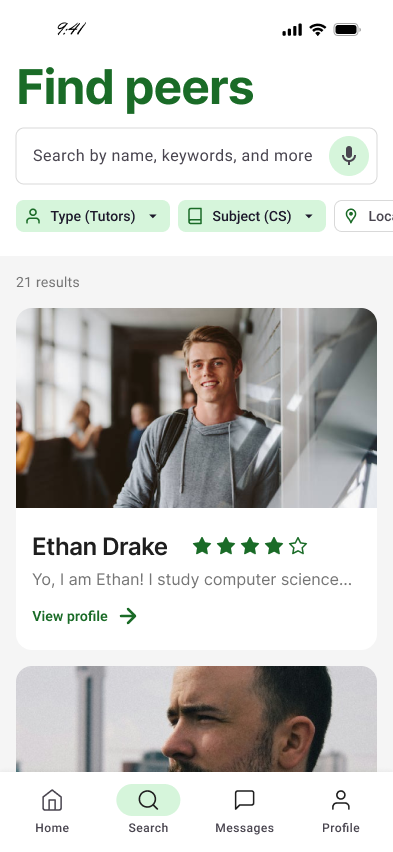
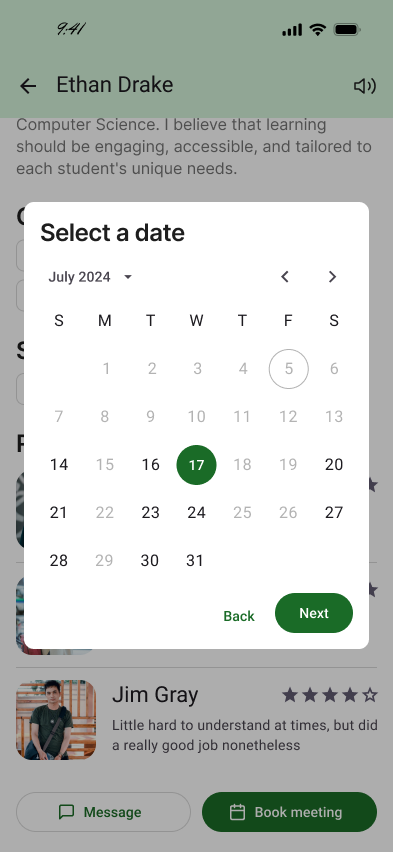
Participants opened the Find Peers tab, applied a subject filter for computer science, selected a tutor, and booked a virtual meeting for July 17 at 2 PM.
- 92.3%found subject filtering at least easy to use.
- 15.4%found switching from default to custom subject sets unclear (flagged for iteration).
- 70%rated tutor profile information at least clear (30% neutral, also flagged).
- 23.1%rated the calendar interface only neutral, the highest-priority polish target in this task.
- 84.6%confirmed the booking confirmation alert provided all expected information.
- 84.7%were satisfied with the overall search-and-book journey.
Signup and onboarding as a student.
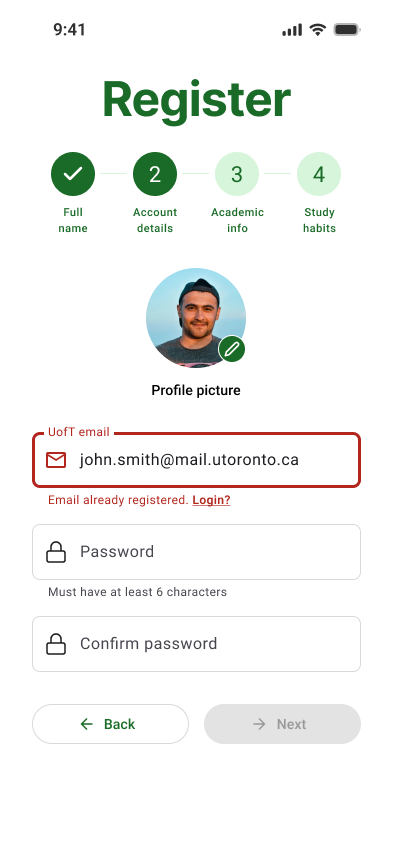
Participants registered a new student account: personal info, profile picture, email + password, academic info (campus, major, subjects, year), and study habits including accommodations.
- 100%completed the personal info step without issue.
- 100%found profile picture upload easy.
- 76.9%rated the email error message at least clear (15.4% neutral, 7.7% very unclear).
- 76.9%rated academic info labels and placeholders at least clear (23.1% neutral).
- 69.2%found entering study habits and accommodations at least easy (23.1% neutral, 7.7% difficult).
- 92.3%confirmed the final confirmation step provided expected information.
- 76.9%were satisfied with the overall signup journey.
Join a peer tutor session.
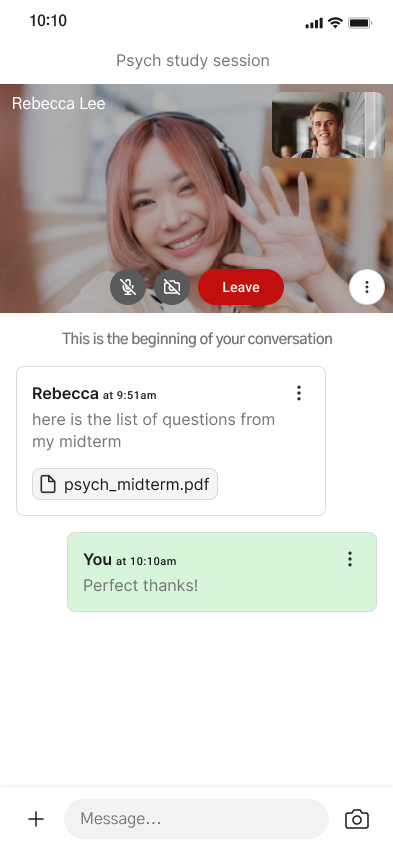
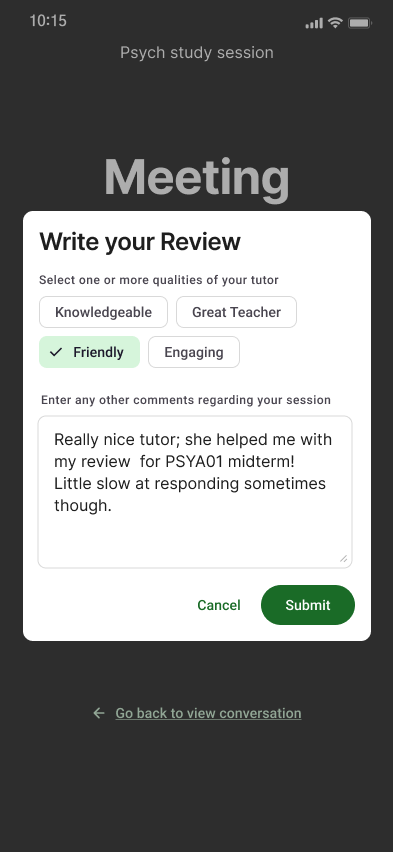
Participants viewed an upcoming meeting banner, opened cancel-meeting flow then backed out, joined a meeting, toggled camera, used in-meeting chat and file sharing, ended the meeting, left a star rating, and submitted a review.
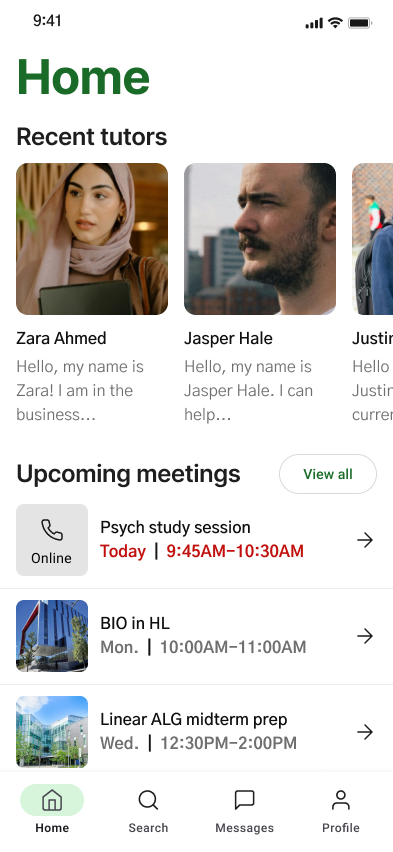
- 84.6%found upcoming-meeting banners at least clear (15.4% neutral).
- 92.3%found the Cancel Meeting button easy to locate.
- 84.7%rated the cancel-meeting alert clear (7.7% unclear, flagged).
- 92.3%rated in-meeting chat box clarity at least clear.
- 76.9%found chat file sharing easy or very easy (23.1% neutral).
- 100%rated the star-rating layout at least clear, the only feature that needed no iteration.
- 84.7%found going back to view the conversation easy or very easy.
chapter 07 —
Key features.
The signature product moments. Each one is a complete scenario the prototype demonstrates end to end.
feature 01 —
UofT-verified signup + multistep onboarding.
Sign-up gated to verified UofT email addresses. Onboarding broken into four short steps: full name, account details (profile picture, password), academic info (campus, major, subject interests, year), and study habits (preferred times, locations, accommodations). Each step is its own screen so the form never feels like a wall, and a top-of-screen progress indicator keeps users oriented.
feature 02 —
Find Peers with filter-rich matchmaking.
Search and filter surface where students choose subject (CS, math, business, etc.), default vs. custom subject sets, and additional filters anchored to the onboarding inputs. Tutor results are scannable profile cards with name, subject expertise, star rating, and a teaser bio.
feature 03 —
Tutor profile + meeting booking flow.
Tutor profile view shows accommodation tags (ADHD, Dyslexia, Autism, Anxiety, In-person, Virtual), past reviews, and a Book meeting CTA. Booking asks for meeting type (Virtual or In-person), then a calendar date, then a 30-minute time slot, then a confirmation alert.
feature 04 —
Home dashboard with upcoming meeting banners.
Home tab surfaces Recent tutors at the top and Upcoming meetings below, each banner showing the session title, day or date, time, and a tap target. The current day's session is highlighted in the brand green so the next thing to do is impossible to miss.
feature 05 —
In-meeting surface with chat, file sharing, and camera.
Virtual meeting view with mute, camera toggle, and leave controls over a video feed plus picture-in-picture self-view. The chat thread sits directly below the call, with inline file attachments (e.g., a TA sharing `psych_midterm.pdf`) and a green-tinted self message bubble.
feature 06 —
Reviews + finished-meeting history.
After a session ends, users tag tutor qualities (Knowledgeable, Great Teacher, Friendly, Engaging) and write a longer comment. The modal sits on top of the dimmed Meeting Finished screen so the review feels lightweight, not bureaucratic, and the conversation thread remains reachable.
chapter 08 —
Try the prototype.
The same Figma file the 13-participant usability study ran against. Zoom, pan, and click through the three tested flows: searching and requesting a tutor session, signup and onboarding, and joining a peer tutor session.
Hosted by Figma. If the embed shows a sign-in prompt, the file is private — open the link below to view in a new tab.
chapter 09 —
Tools & technologies.
Figma
The high-fidelity prototype: multistep onboarding, Find Peers, tutor profiles, calendar booking, upcoming meeting banners, in-meeting interface, and reviews. The same Figma file was the artifact participants interacted with during the asynchronous usability study.
Surveys + unstructured interviews
Requirements gathering: a 30-response survey distributed via r/UTSC and r/UTM on Reddit, plus two unstructured interviews with non-CS students to fill demographic gaps. Findings organized into five categories: study habits, matchmaking, privacy and security, usability, and motivation.
Nielsen's 10 heuristics + Google Forms
Evaluation framework: H1 (visibility of system status), H3 (user control and freedom), H6 (recognition rather than recall). Thirteen participants completed remote Google Form questionnaires while interacting with the Figma prototype across three tasks: searching/requesting a tutor session, signup and onboarding, and joining a peer tutor session.
Personas, scenarios, HTA
Two personas (a potential tutor and a potential tutee) captured the user base with minimum overhead. Scenarios fleshed out signup, scheduling, messaging, and virtual meeting tasks. A hierarchical task analysis broke each main task into subtasks and informed the structure of the prototype.
chapter 10 —
What the project actually argues.
Tutorly's thesis is that peer tutoring is one of the rare interventions that improves both academic and social outcomes for university students at once, and that the design problem is making it easy to start, safe to participate in, and structured enough that students stay. The research process backed the thesis with four cited studies (Bowman-Perrott 2013, Collier 2021, Gehreke 2024, Moghimi 2023), a 30-response survey, two interviews, and a 13-participant usability study evaluated against Nielsen's 10 heuristics.
For my own product instincts, the project drove home that user research is what changes a design, not stylistic iteration. The UofT-only sign-up, the multistep onboarding structure, the calendar-interface refinement priority, and the emphasis on user-controlled matching all came directly out of the survey and usability data. The Nielsen H1/H3/H6 framing was what made the evaluation scoreable rather than vibes-based.
It was also a six-person team project for CSCC10 (HCI), and that collaboration shaped the work as much as the research did. Building a design system, splitting feature areas, and reaching consensus on what counted as "done" inside a 16-week course was its own product skill.
chapter 11 —
Honest caveats (from the team's own analysis).
the honest caveats —
- High-fidelity Figma prototype, not a shipped iOS or Android app. The matching engine, meeting surface, and chat are designed and demonstrated, not production-implemented.
- Usability study sample size is 13 participants. Adequate for design direction across the three tested tasks, but small relative to the target user base of all UofT students.
- Survey demographics skewed STEM. Reddit distribution on r/UTSC and r/UTM pulled mostly computer science respondents, so subject demand (math, CS, business) likely under-represents arts and life-sciences students.
- Asynchronous Figma + Google Form testing means the team could not guarantee participants navigated the prototype correctly. Detailed instructions mitigated, did not eliminate, the risk.
- Some prototype limitations bled into results: star ratings did not update visually in Figma, which the participants flagged as "unclear" even though the issue was the tool, not the design.
- Course scope, sixteen weeks. Future work the team explicitly named: larger and more diverse panels, responsive design across device sizes, a desktop companion, Fitts' Law-driven button sizing, and A/B testing on the Find Peers task.
chapter 12 —
References.
The five studies cited in the literature review and problem statement, in APA format. All sources are peer-reviewed except Brown (2024), which is industry survey reporting.
- [1]Bowman-Perrott, L., Davis, H., Vannest, K., Williams, L., Greenwood, C., & Parker, R. (2013). Academic benefits of peer tutoring: A meta-analytic review of single-case research. School Psychology Review, 42(1), 39-55. https://doi.org/10.1080/02796015.2013.12087490
- [2]Brown, M. (2024, April 11). College students lack confidence in their post-grad careers. LendEDU. https://lendedu.com/blog/are-college-students-prepared-for-career/
- [3]Collier, P. (2021). How peer mentoring can help universities promote student success in a post-COVID-19 pandemic world. Metropolitan Universities, 32(3), 37-54. https://doi.org/10.18060/25222
- [4]Gehreke, L., Schilling, H., & Kauffeld, S. (2024). Effectiveness of peer mentoring in the study entry phase: A systematic review. Review of Education, 12(1). https://doi.org/10.1002/rev3.3462
- [5]Moghimi, E., Stephenson, C., Gutierrez, G., Jagayat, J., Layzell, G., Patel, C., McCart, A., Gibney, C., Langstaff, C., Ayonrinde, O., Khalid-Khan, S., Milev, R., Snelgrove-Clarke, E., Soares, C., Omrani, M., & Alavi, N. (2023). Mental health challenges, treatment experiences, and care needs of post-secondary students: A cross-sectional mixed-methods study. BMC Public Health, 23(1). https://doi.org/10.1186/s12889-023-15452-x