TMG Website Redesign: From Static Brochure to Task-Oriented Experience.
A 90-day mobile-first redesign of the UTSC Marketing Group's website that cut bounce rate from 62% to 23%, grew sessions by 67%, and reached an average session duration of 3m 36s. Rebuilt the information architecture around five distinct user journeys — students, event attendees, applicants, sponsors, and social visitors — and applied a full suite of HCI principles (Nielsen heuristics, Shneiderman's golden rules, Fitts's Law, Hick's Law, Gestalt) across every page.
+67%
total site sessions
62%→23%
bounce rate reduction
+45%
unique visitors
3m 36s
avg session duration
Skills used
chapter 01 —
A product-minded UX overhaul of a student organization web presence.
The Marketing Group (TMG) at the University of Toronto Scarborough had a Wix-hosted website that communicated brand identity but generated significant engagement friction: a 62% bounce rate, weak mobile usability, shallow navigation, and conversion paths that required users to search for next actions. The 90-day redesign treated the website as a product with measurable user journeys rather than a digital brochure with pages. The outcome was a mobile-first, task-oriented experience structured around five distinct audience jobs: students discovering TMG, event attendees finding what to attend, applicants evaluating whether to join, sponsors evaluating partnership, and social visitors looking for the Linktree. Each page was rebuilt with a clear information hierarchy, specific CTAs, and a design system — brand pink, navigation navy, Raleway headings, Wix Madefor Text body, 1180px desktop content width — that creates consistency across every surface. Analytics confirmed the shift: sessions up 67%, unique visitors up 45%, bounce rate dropped to 23%, and average session duration of 3m 36s.
chapter 02 —
Six original UX problems that analytics confirmed were real.
The redesign was not driven by aesthetic preference. Google Analytics data pointed to specific engagement problems that traced to identifiable UX failures in the original Wix site. Mobile usability: the old layout did not reliably adapt to a phone viewport — navigation compressed, section spacing broke, and interaction targets were too small for mobile students. Mobile traffic was the largest segment, so every user on a phone was hitting a degraded experience. Information architecture: the old four-item navigation did not expose the user tasks that mattered most — events, joining, sponsorship, organizational structure. Visitors with a clear goal (apply, sponsor, find a specific event) had no efficient entry point. Cognitive load: large photo compositions with overlapping content regions, mission copy over a busy team photograph, and sparse whitespace forced users to infer page purpose and next steps. The visual hierarchy competing with decorative imagery meant important content did not read as important. Weak conversion paths: the joining path, event discovery, and sponsor engagement all required users to locate the relevant action. CTAs were present but buried beneath content that did not orient them. Inconsistent hierarchy: important content competed with decorative imagery, blank space, and a Wix platform banner. The brand was visible; the actions were not. Limited orientation: the site gave users little sense of where they were in the experience. Navigation did not reflect active states, footer was sparse, and section structure did not sequence the experience from awareness to action.
chapter 03 —
Product decisions.
The decisions behind the work and the reasoning for each.
Hick's Law + information architecture —
Redesign navigation around user jobs-to-be-done, not internal page structure.
The old navigation had four items that mapped to internal TMG structure rather than student intent. The new navigation exposes six destinations — Home, About, Events, Sponsors, Join Our Team, Linktree — organized to answer the questions real visitors arrive with: "What is TMG?", "What events can I attend?", "How do I join?", "Should we sponsor?". Hick's Law predicts that adding choices increases decision time; the redesign counters this by grouping related decisions (event sub-pages under Events, department sub-pages under About) so the top-level choice set stays small while depth is available for committed users. The active state and grouped dropdowns keep users oriented rather than requiring them to remember where they are.
Universal usability + Fitts's Law —
Mobile-first layout as the design constraint, not a responsive afterthought.
The student audience discovers events, clubs, and applications from phones. Starting the redesign from a 390px mobile viewport forced information hierarchy decisions that improved the desktop too. Every section on the homepage had to earn its above-the-fold position when constrained to a single column — two sections that were not being scrolled to on desktop were cut as a result. Fitts's Law drove specific decisions on mobile: pill CTAs were sized and padded to be comfortable thumb targets, action buttons were placed below relevant content (not floating at page edges), and the bottom navigation on the events page kept tab switching within reach. The result was not a stripped-down mobile variant but a layout that happened to also work at 1180px.
Gestalt grouping + cognitive load reduction —
Apply Gestalt proximity and similarity to organize team and event content.
The old About page displayed team members in a large undifferentiated grid. Users had no way to quickly understand organizational structure, department responsibilities, or which team was relevant to their goal. The redesign grouped team members by function — leadership, business development, events, marketing, operations — with a clear visual break between departments. Gestalt proximity (items close together are read as a group) and similarity (consistent portrait style, role label, and LinkedIn affordance per card) do the work of communicating structure without explicit labels for every relationship. The same principle was applied to event cards: title, date, description, image, and CTA repeat in the same spatial relationship across every event so users learn to scan the pattern after the first card.
Audience segmentation + Nielsen's user control —
Separate sponsor and CBA applicant paths into dedicated audience experiences.
The original site mixed sponsor information into general student content. A potential corporate sponsor landing on the homepage found student-facing event content before finding any partner-relevant information. The redesign created a dedicated Sponsors page with a partner-specific first impression, an explicit "Why Sponsor TMG" section (talent pipeline, brand exposure, industry insights, past partner credibility), and a sponsor contact path independent of the student membership flow. The same separation was applied to the CBA Applications route: instead of a centered information card, the new page uses community photography, a role-specific headline, and a "Why Become a CBA?" benefits section that turns a passive information page into a conversion surface. Both pages follow Nielsen's match-between-system-and-real-world: the copy, imagery, and CTAs match what each audience is actually evaluating.
Shneiderman's golden rules + conversion design —
End every page section with closure and a clear next action.
Shneiderman's rule "design dialogs to yield closure" guided the page-level structure. Every major section ends with an action: the homepage hero with "Join The Herd" and "Follow Us", the events section with "View All Events", the about section with "Meet the Team", the sponsor section with "Become a Sponsor", the CBA page with a direct application CTA. This is not just aesthetic — it is functional. Users who finish reading a content block and find no next step bounce or navigate to an unrelated destination. By anchoring every section to an action, the design turns awareness into engagement and engagement into conversion. The footer was also redesigned from a closing brand element into a recovery and wayfinding surface with grouped menu links, contact, address, and social destinations — so users who scroll past what they need can reorient without using the browser back button.
Nielsen heuristics + Shneiderman's golden rules —
Document every design decision against specific HCI principles for institutional knowledge.
A redesign that cannot articulate its rationale is vulnerable to being undone by whoever maintains the site next. Every page-level UX decision in this project was mapped to a specific heuristic or principle: recognition over recall (navigation labels reflect user goals, not internal naming), consistency and standards (buttons, cards, section headings repeat across pages), error prevention (clear navigation and footer links reduce wrong turns), reduced short-term memory load (options stay visible rather than requiring users to remember where to find them). Maintaining a documented case study alongside the live site gives future maintainers a design rationale to refer to when they are tempted to add a feature or rearrange a section. The design system — color tokens, typography scale, card anatomy, CTA variants — is documented in the same case study so future contributors work from the same visual language.
chapter 04 —
Before and after.
Seven surface-level comparisons from the same viewport dimensions. The old site had personality and brand energy — the challenge was not to replace that, but to give students, applicants, and sponsors a clearer path through it.
Homepage.
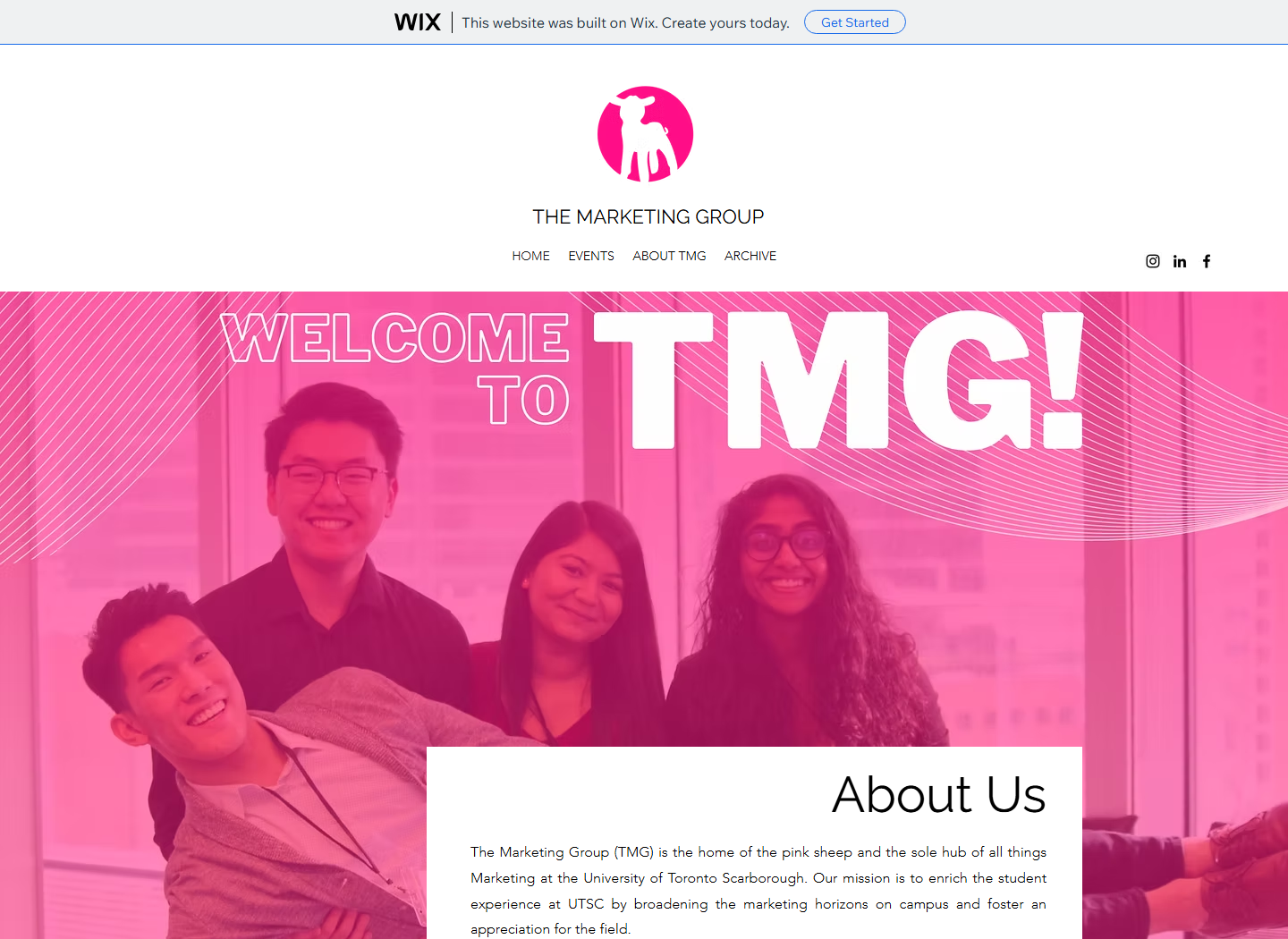
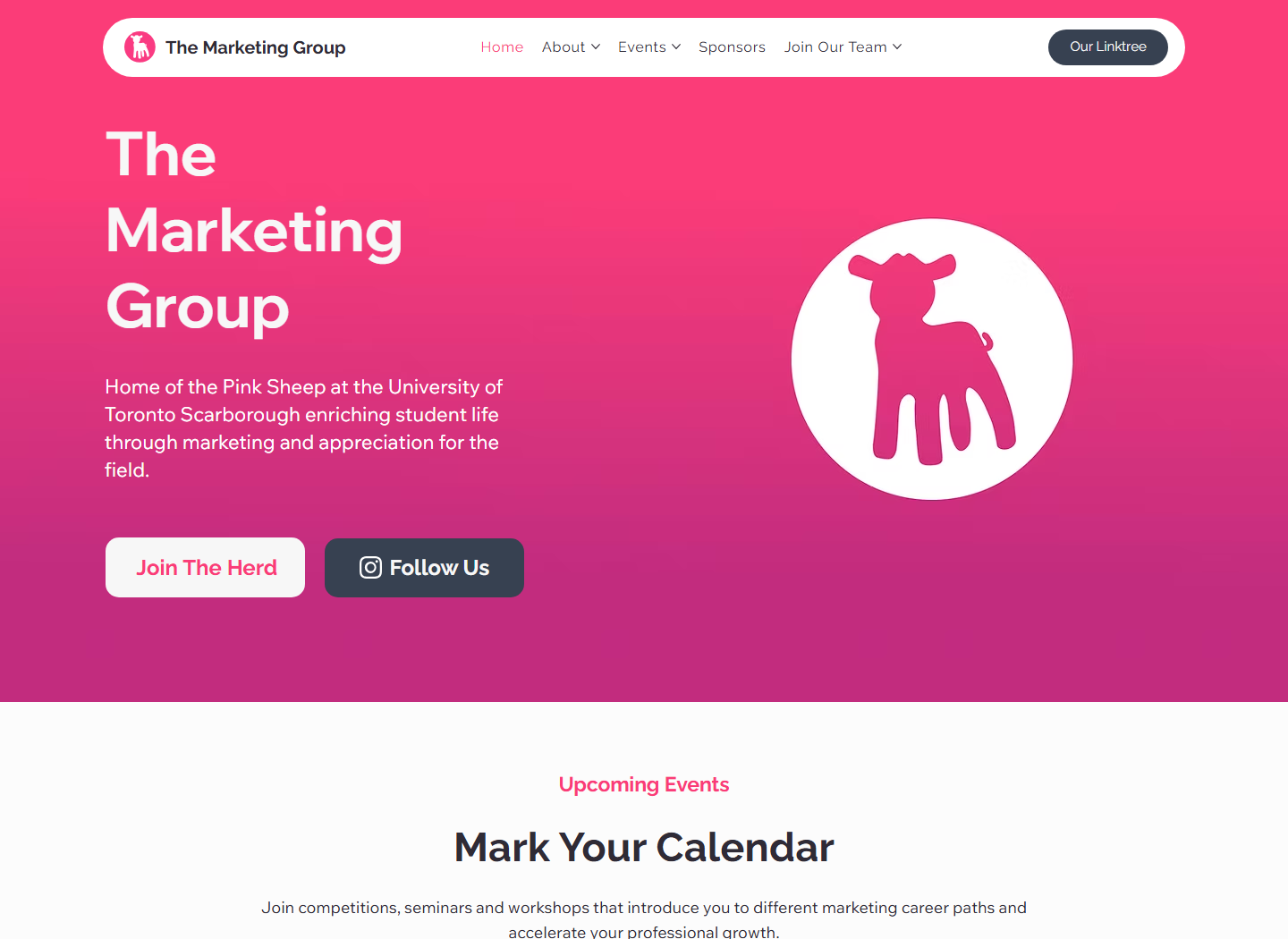
The old homepage led with a pink photo overlay, centered logo stack, and overlapping About copy — strong brand energy, but the first screen made users infer what to do next. The new homepage sequences the experience: navigation → brand identity → value proposition → two primary CTAs → event cards. Each zone does one job before passing to the next.
Navigation.


The old nav compressed brand logo, menu items, event links, and social icons into one compact strip. The new navigation groups destinations by user intent — About, Events, Sponsors, Join Our Team — with dropdown depth available for committed users, an active state, and the Linktree as a top-level destination. Hick's Law at the nav level: same number of decisions, organized so each one maps to a real job.
Events page.
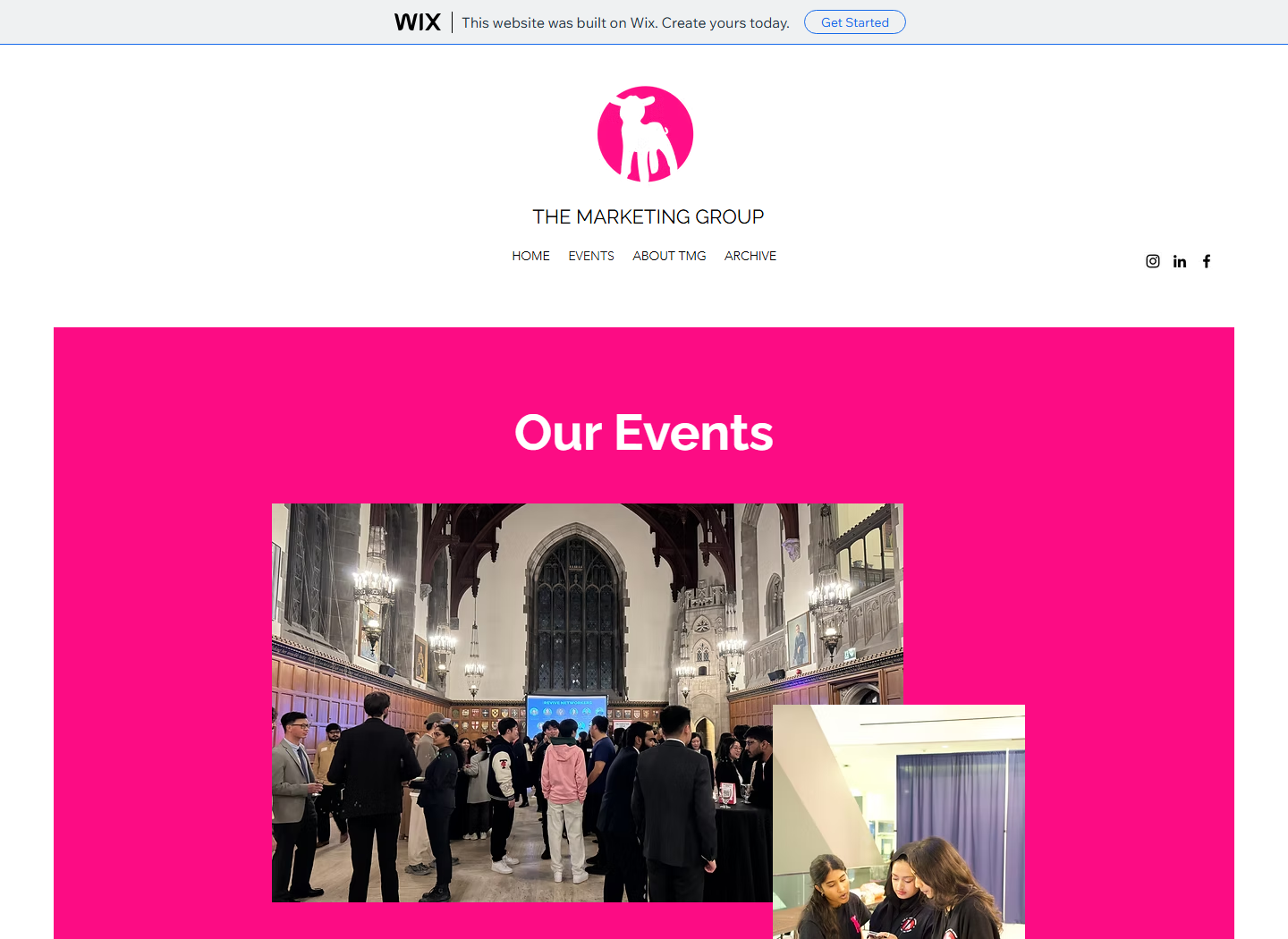
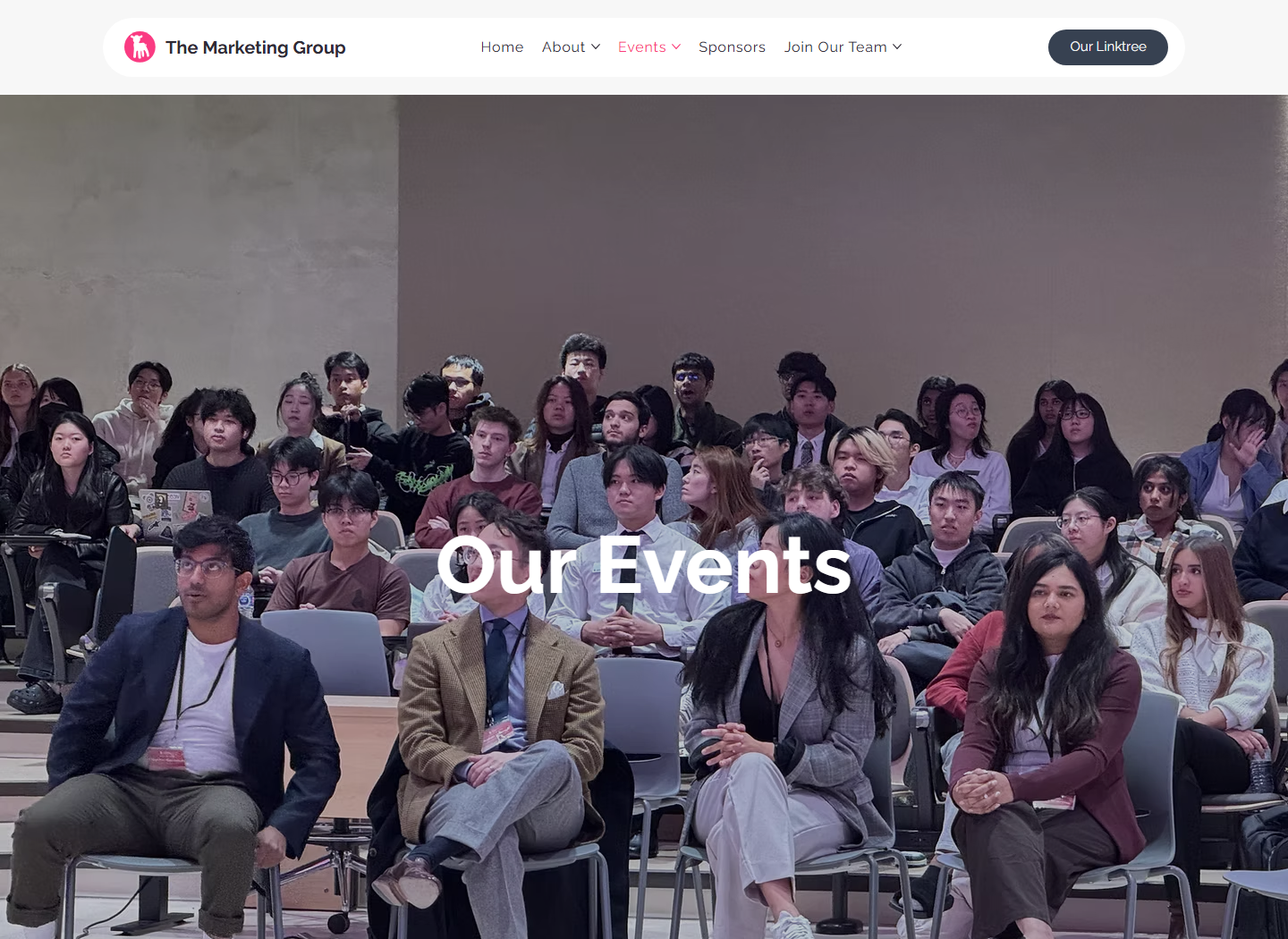
The old events page read as a promotional banner — strong pink composition, event name, broad summary. The new page opens with a full-width audience photo, a direct "Our Events" headline, and a short participation prompt that explains why students should attend. Event entries below follow a repeatable card pattern: title, date, description, image proof, outcomes, CTA. The shift is from announcement to persuasion.
About page.
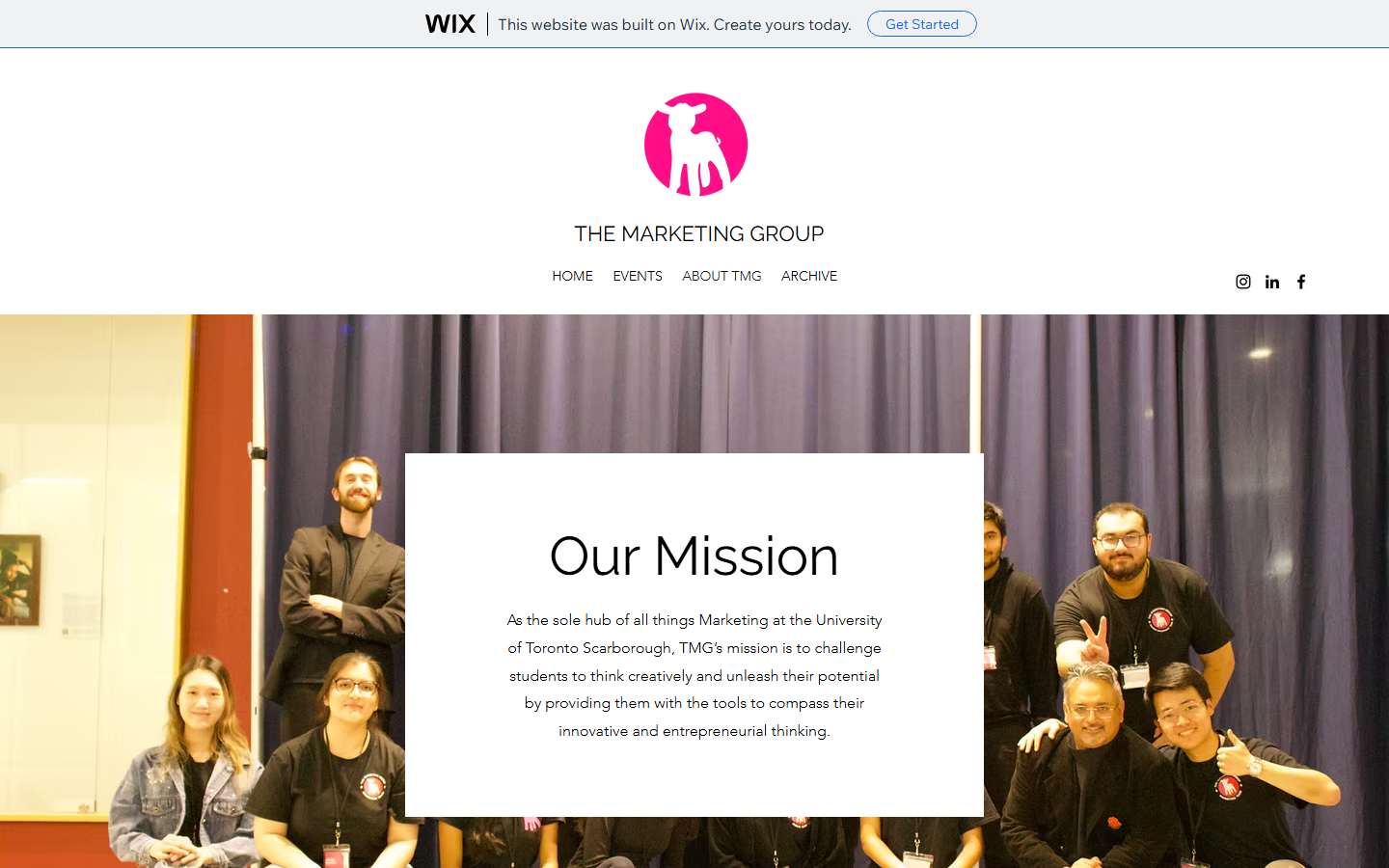
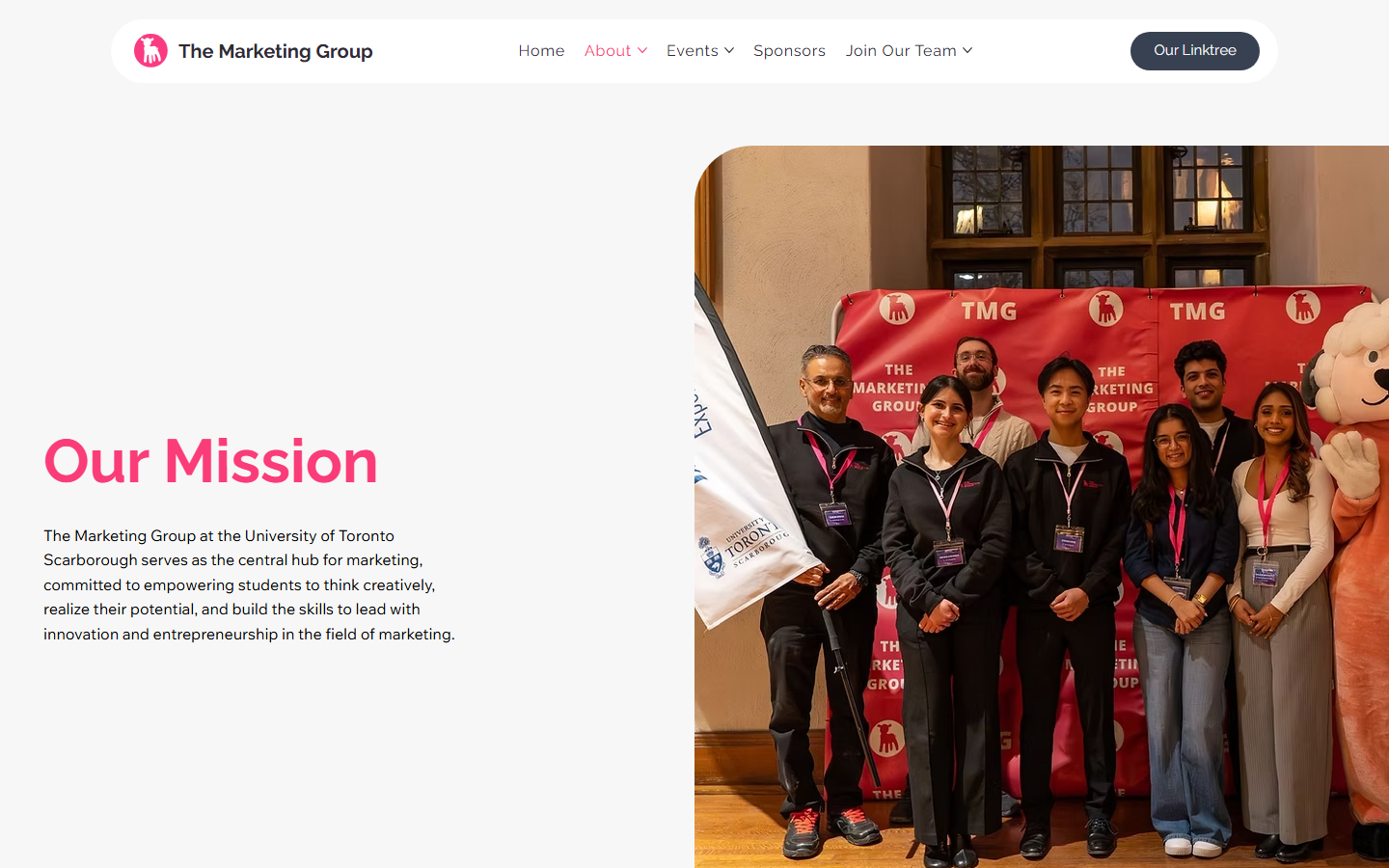
The old About page placed the mission copy as a white card over a large team photo — readable, but the background competed with the message. The new layout separates them: mission in its own two-column content zone, team members grouped by department below. Gestalt proximity does the organizational work — no explicit labels needed to see where leadership ends and marketing begins.
CBA Applications.
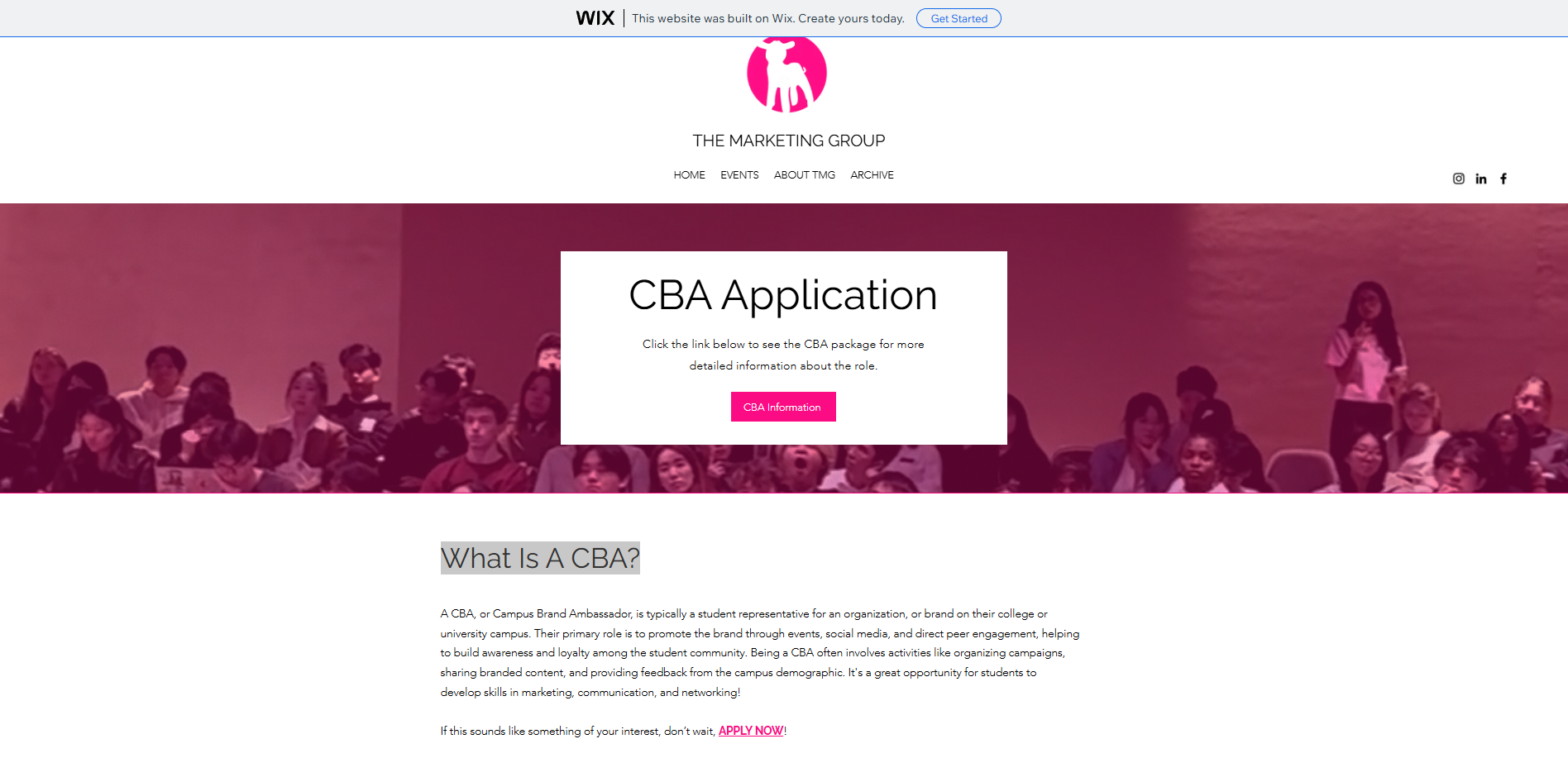
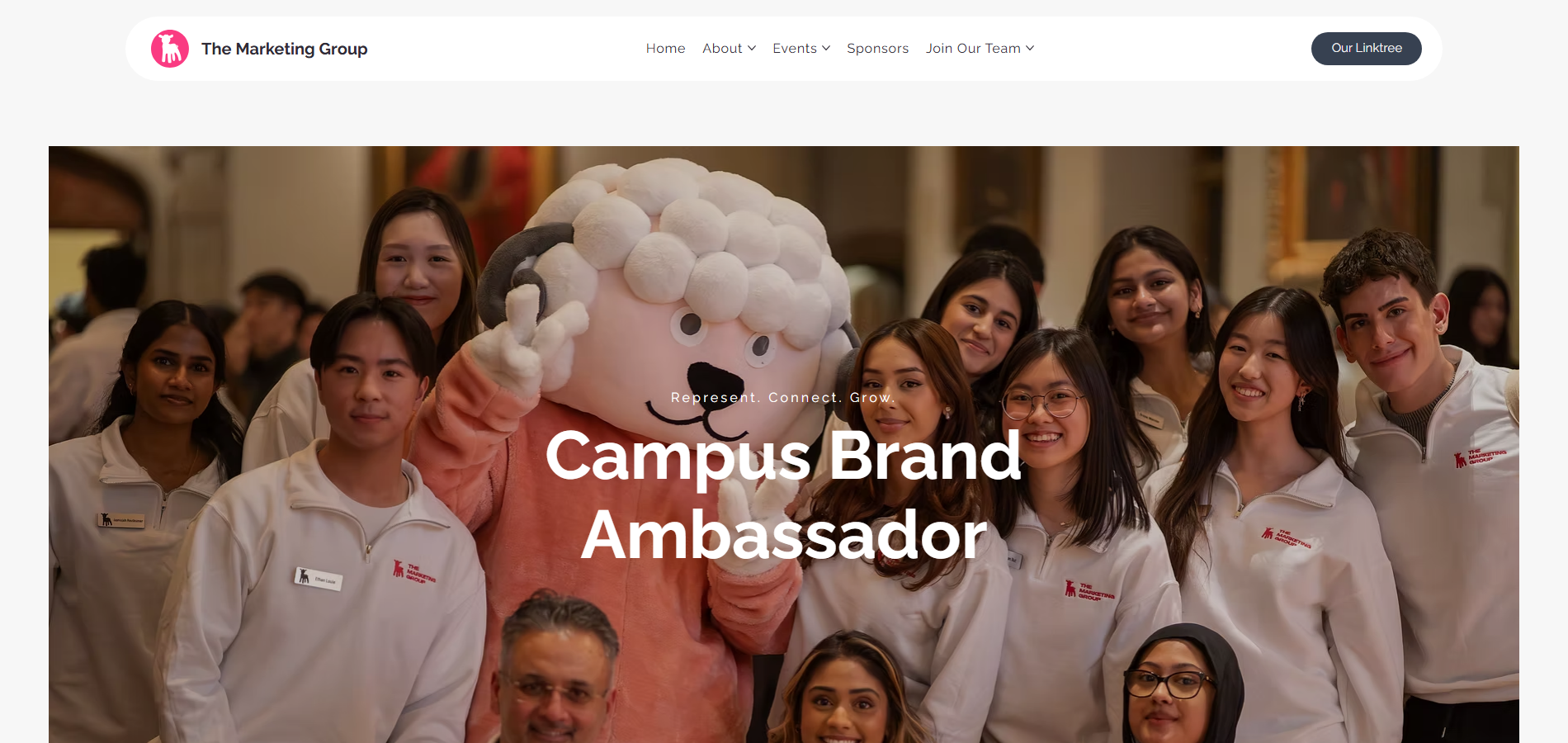
The old CBA page was informational — a centered white card explaining what a Campus Brand Ambassador is. The new page is a conversion surface: community photography, the value line "Represent. Connect. Grow.", and a "Why Become a CBA?" section with concrete benefit framing before the application path. Students were not asking what a CBA is — they were asking why they should become one.
Sponsor path vs. archive.
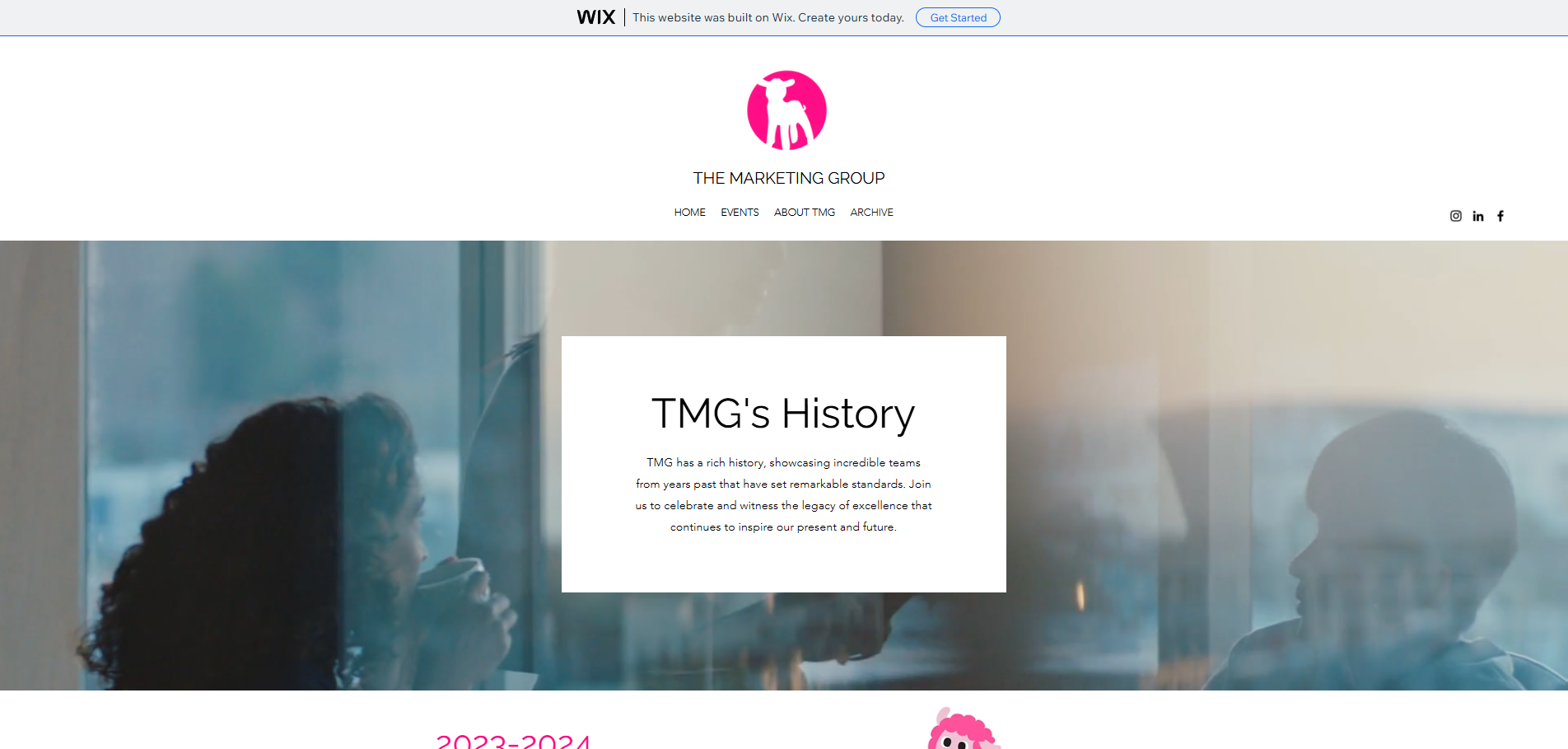
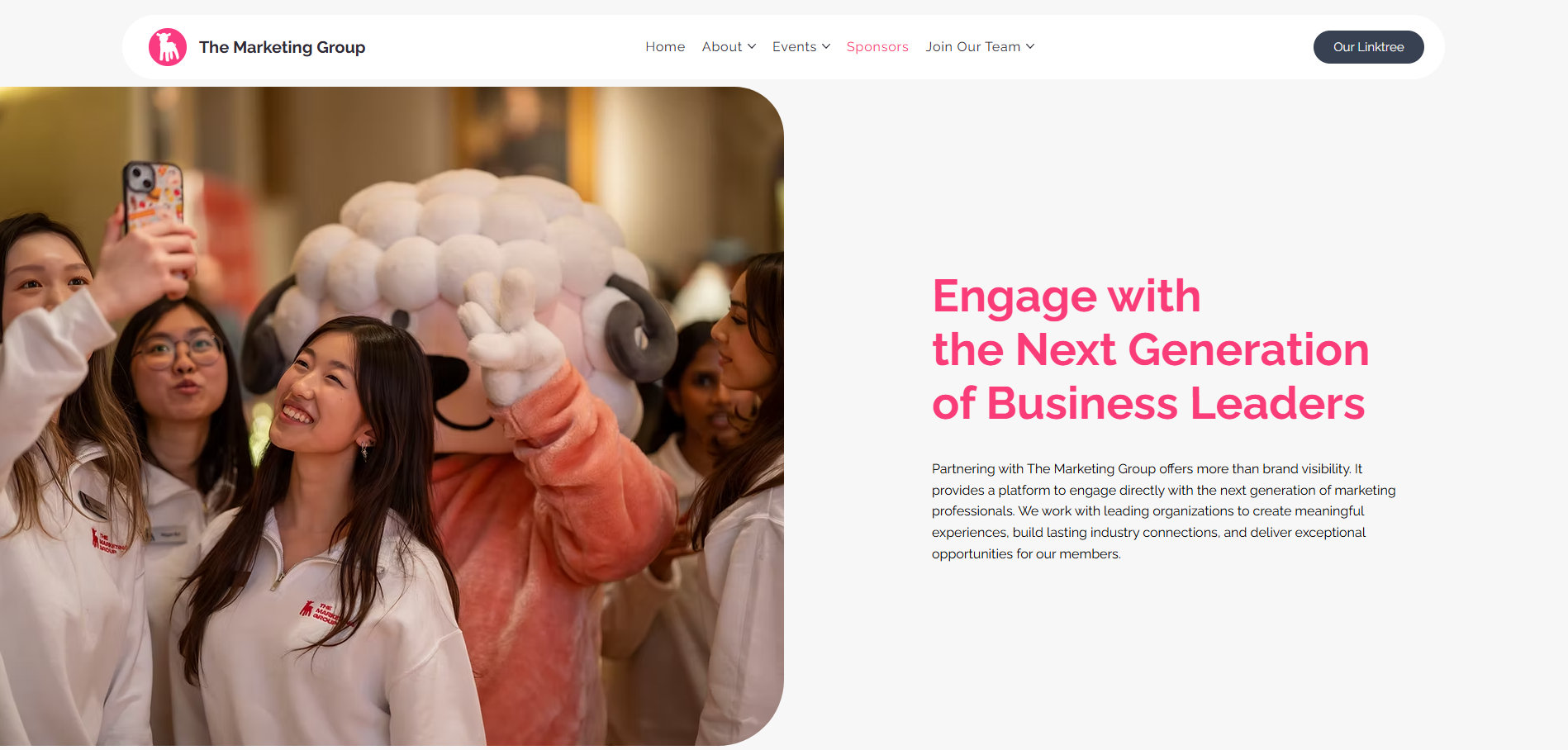
The old site mixed sponsor information into general student content; what remains is an archive-style page. The new Sponsors page is a dedicated partner experience: audience-specific hero, a "Why Sponsor TMG" section with four explicit benefit categories (talent pipeline, brand exposure, industry insights, past-partner credibility), and a direct contact CTA. Audience segmentation as an IA decision, not just a visual one.
Mobile homepage.
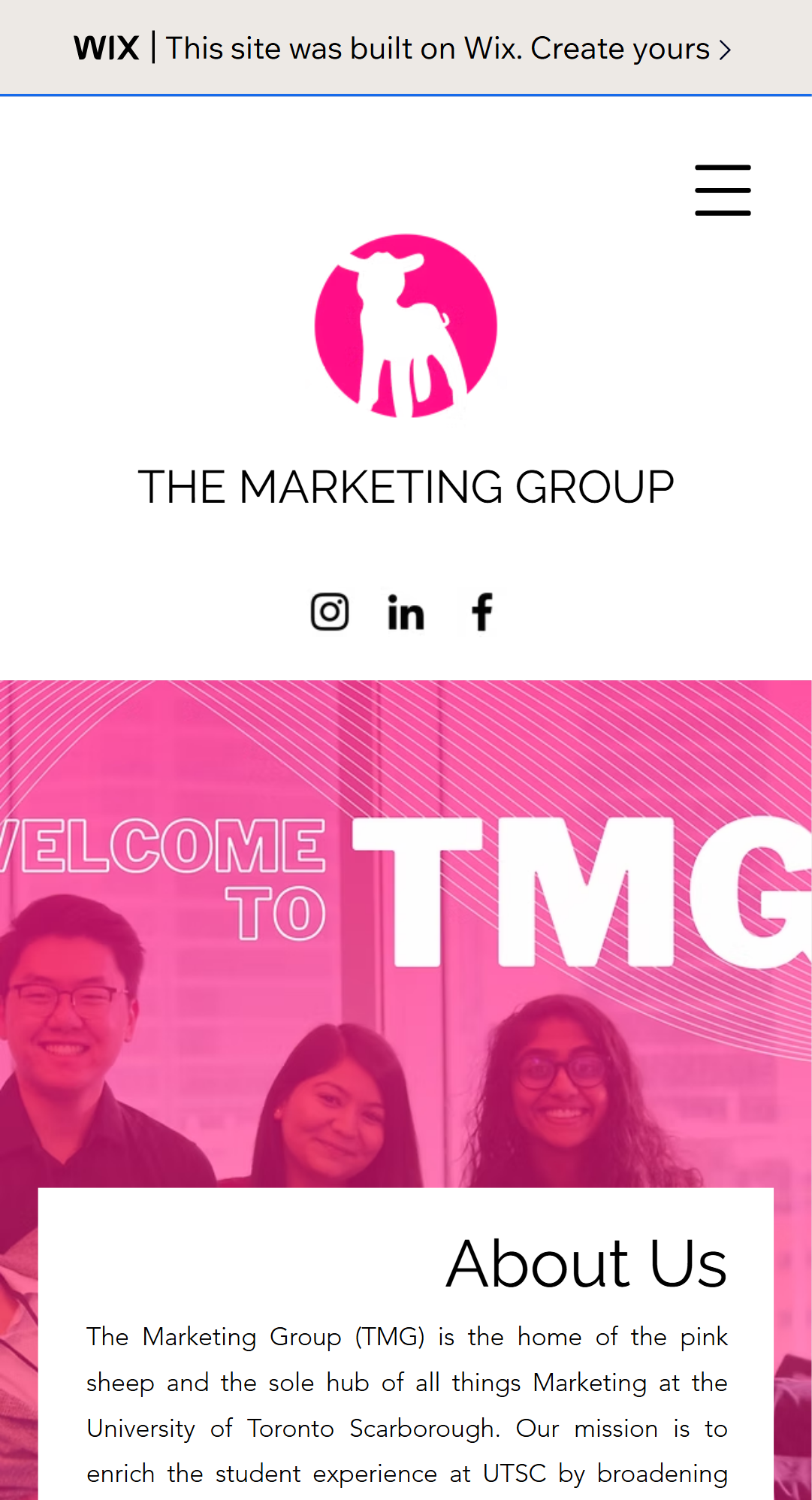
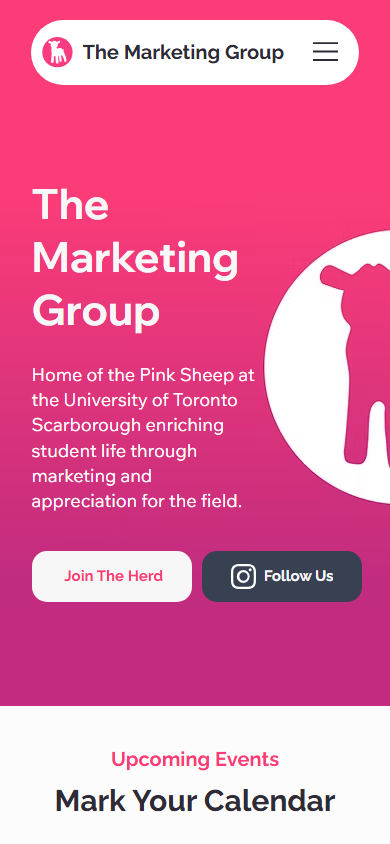
The old site did not adapt reliably to a 390px viewport — navigation compressed, section spacing broke, and tap targets were undersized for mobile students. The new mobile layout is the canonical starting point: single-column flow, oversized headline and CTAs, stacked event cards, and a footer with grouped navigation links. Because it was designed mobile-first, the hierarchy holds cleanly at every breakpoint rather than stretching a desktop layout.
chapter 05 —
Design system.
The redesign uses a documented visual language so future maintainers can work from consistent tokens rather than guessing. Pink remains the primary brand signal; navy grounds actions and navigation.
palette —
Brand pink
#E83E8C
Primary brand color — hero headlines, primary CTA fills, accent borders, and tab indicators throughout the site.
Deep pink
#C2185B
Hover and active state for pink elements. Provides sufficient contrast shift to signal interactivity without leaving the brand palette.
Navigation navy
#1A2744
Navigation background, footer background, and dark CTA fills. Navy grounds the high-energy pink brand color and creates clear figure-ground separation for white text.
Body ink
#1F2937
Primary body text and section headings on light backgrounds. Near-black rather than true black for softer reading across long-form content sections.
Soft surface
#FFF5F8
Section backgrounds and card fills on pages with heavy content. Warm white with a faint pink cast keeps the brand palette present without saturating the page.
Divider line
#EDD5E0
Section dividers, card borders, and horizontal rules. Muted pink-grey separates content zones without creating harsh visual breaks.
typography —
Display heading
Raleway 700, 40–56px / 1.1, white or navy
The Marketing Group
Section heading
Raleway 600, 28–36px / 1.2
Our Events
CTA label
Raleway 600, 14–16px / 1.0, uppercase tracked
JOIN THE HERD
Body copy
Wix Madefor Text 400, 16–18px / 1.6
Connect with like-minded students and build real marketing experience.
Supporting / metadata
Wix Madefor Text 400, 13–14px / 1.5, muted
Event · April 2025 · UTSC
components —
Pill navigation
Rounded nav links with dropdown affordance. Active state uses a pink underline or fill. Groups Home, About, Events, Sponsors, Join, and Linktree at the top level with sub-pages in dropdown menus.
Primary CTA
White or pink pill button with navy label. Used at hero moments — "Join The Herd", "Follow Us", "Become a Sponsor". Standardized padding and radius across all pages.
Secondary CTA
Transparent pill with a pink or white border. Used for secondary actions adjacent to primary CTAs — "Learn More", "View Events". Same sizing as primary so CTAs align naturally in rows.
Event card
Repeatable content pattern: title, date, one-line description, event image, outcome statement, and CTA. The same card structure appears on the homepage events section and the Events page, so students learn to scan it after the first instance.
Team member card
Portrait photo, name, role label, and LinkedIn link in a fixed-size card. Cards group into department rows using Gestalt proximity — a visual break between leadership and operations without an explicit divider element.
Footer wayfinding
Dark navy footer with grouped navigation columns (About, Events, Connect), contact info, address, and social links. Designed as a recovery surface: users who scroll past a CTA can reorient without the browser back button.
chapter 06 —
Key findings.
+67%
Total site sessions
Sessions grew 67% in the 90 days following the redesign. The combination of clearer navigation, stronger event discovery, and dedicated audience paths (student, sponsor, applicant) gave each visitor segment more reasons to explore the site rather than exit after a single page.
62%→23%
Bounce rate
Bounce rate fell from 62% to approximately 23% — a 39-point reduction. The most significant driver was mobile layout: once the first screen gave students a clear read on TMG's value and a visible next action, the proportion of single-page exits dropped sharply. A 23% bounce rate is strong for a student organization site.
3m 36s
Average session duration
Average session duration reached 3m 36s. This is an engagement signal, but duration alone does not establish which journeys users took. The repeatable event cards and grouped team content were designed to make deeper exploration easier.
+45%
Unique visitors
45% more unique visitors in the post-redesign period. Some of this reflects word-of-mouth and social promotion, but the retention improvement (lower bounce, longer sessions) also means repeat visits contributed more unique-visitor counts than in the previous period. A site that users return to for event updates and application deadlines compounds its visitor count over a semester.
chapter 07 —
Key features.
The signature product moments. Each one is a complete scenario the prototype demonstrates end to end.
feature 01 —
Homepage redesign.
The new homepage gives users a clear first scan: navigation, organization identity statement, supporting copy, Pink Sheep mascot, and two primary CTAs above the fold. Upcoming events surface as scannable cards immediately below the hero. The section ends with social follow and Linktree actions. On mobile, the same content collapses into a single-column flow that preserves reading order and keeps the primary CTA reachable without scrolling.
feature 02 —
Events page.
The events page opens with a full-width audience photo, a direct "Our Events" headline, and a short participation prompt that explains why students should attend, not just that events exist. Below, event entries follow a repeatable pattern: title, date, description, image proof, outcomes, and CTA. A supporting "Other Events" module shows the breadth of TMG programming. The page ends with a social follow action that keeps the community connection visible after event content is consumed.
feature 03 —
About page and team structure.
The About page separates mission copy from the team photo into a two-column desktop layout, resolving the figure-ground clarity issue of the old design (white mission card over a busy team image). Team members are organized by department — leadership, business development, events, marketing, operations — using Gestalt proximity to make organizational structure immediately recognizable. Each card shows portrait, name, role, and a LinkedIn link. The mobile view gives each department section a clear vertical order.
feature 04 —
Sponsors page.
The sponsors page is a dedicated audience experience for external partners, separate from student-facing content. It opens with a partner-specific hero, then presents an explicit "Why Sponsor TMG" section with four benefit categories: talent pipeline access, brand exposure at student events, industry insights, and past partner credibility (with partner logos). The page ends with a direct "Become a Sponsor" CTA. Sponsors arrive with a specific evaluation question — is this a credible, valuable partnership? — and the page answers that question before asking for contact.
feature 05 —
CBA Applications page.
The Campus Brand Ambassador recruitment page uses community imagery, a role-specific "Campus Brand Ambassador" headline, and the value line "Represent. Connect. Grow." to communicate the opportunity before explaining it. The supporting "Why Become a CBA?" section converts the application page from a passive information destination into a conversion surface with concrete benefit framing: leadership development, networking opportunities, and marketing experience. The application path feels current, visible, and connected to student identity.
feature 06 —
Mobile layout.
The full redesigned experience on a 390px phone viewport: compact header with navigation controls, single-column hero with primary CTAs, stacked event cards with readable type, and a bottom-anchored footer with grouped navigation links and social destinations. Tap targets throughout are sized for thumb interaction. The mobile layout is not a stripped-down variant — it is the canonical layout from which the desktop was derived, which is why the hierarchy choices hold at every breakpoint.
chapter 08 —
Tools & technologies.
Wix Studio
Design and development environment for the live UTSC TMG website. Wix's visual editor enabled rapid iteration on layout, component styling, navigation structure, and responsive breakpoints without a custom code deployment pipeline. Design system tokens (colors, type scale, spacing) were maintained across pages via Wix's global styles panel.
Google Analytics
Primary measurement tool. Session volume, unique visitors, bounce rate, and average session duration were tracked before and after the redesign to validate UX hypotheses with behavioral data rather than qualitative feedback alone. Analytics data was also used to diagnose the original UX problems: a 62% bounce rate and shorter sessions confirmed that first-impression clarity and navigation depth were the highest-priority fixes.
HCI frameworks (Nielsen, Shneiderman, Fitts, Hick, Gestalt)
Design rationale. Every page-level decision was mapped to a specific principle: recognition over recall drove navigation label choices, Hick's Law shaped the dropdown grouping strategy, Fitts's Law set CTA sizing and placement on mobile, Gestalt proximity and similarity organized team and event card layouts, and Shneiderman's closure rule governed section endings. Mapping decisions to principles also produced the case study documentation that gives future site maintainers a rationale to work from.
Viewport capture and visual documentation
Screenshot evidence for before/after comparison across desktop and mobile viewports. Captures were normalized within each comparison so visual differences come from the websites, not mismatched case-study containers. Captures include homepage, navigation dropdown, events, about, sponsors, CBA applications, and the full mobile layout across multiple pages.
Information architecture mapping
Navigation restructuring from a four-item flat menu to a six-destination grouped navigation organized by user intent: Home, About (with department sub-pages), Events (with event sub-pages and CBA), Sponsors, Join Our Team, and Linktree. IA mapping preceded visual design to ensure each page had a clear audience, job-to-be-done, and conversion moment before any component was placed.
chapter 09 —
What a 90-day UX redesign actually moves — and what it does not.
The analytics results are the most legible part of the outcome: 67% more sessions, 45% more unique visitors, bounce rate from 62% to 23%, average session duration of 3m 36s. Those numbers confirm that the redesign moved the metrics it was optimizing for — first-impression clarity, mobile usability, navigation depth, and conversion path strength.
The less visible outcome is the design system. A Wix site without documented design principles drifts: well-meaning maintainers add a section here, change a CTA color there, and six months later the visual language is inconsistent. The case study paired with the live site gives future contributors a documented rationale: here is why the navigation is structured this way, here is the color system, here is what "Hick's Law" meant for how we grouped the dropdown items. That documentation is the difference between a redesign that lasts and one that gets gradually overwritten.
The remaining UX opportunity is conversion measurement beyond sessions. Sessions and duration tell you that users are engaging more; they do not tell you how many joined TMG, applied to become a CBA, or reached out as a sponsor as a result. Wiring analytics events to every CTA click and tracking the event-page-to-registration path would close that loop and give the next redesign cycle a behavioral basis for prioritization rather than an analytics-and-judgment one.
chapter 10 —
Honest caveats.
the honest caveats —
- Wix's editor constraints limit what is achievable in custom animation, advanced data binding, and performance optimization. A Next.js or SvelteKit build would offer more control over Core Web Vitals and interaction patterns, at the cost of a deployment pipeline the organization may not be able to maintain.
- Analytics coverage does not yet include CTA-level event tracking. Session and duration metrics confirm engagement improved, but conversion rates for specific actions (join form submissions, sponsor contact clicks, CBA applications) are not yet measured separately.
- A formal accessibility audit has not been completed. The redesign improves contrast, readability, and responsive layout, but keyboard navigation, screen reader heading order, focus states, and ARIA labels require a Lighthouse or axe audit to validate.
- The 90-day measurement window may include confounding variables: increased event activity, social media campaigns, and seasonal student engagement patterns can all shift session volume independently of the redesign. A longer measurement period would increase confidence in the attribution.
- Content lifecycle management — archiving past events, updating application deadlines, refreshing sponsor lists — is not systematized. Without a content governance plan, the site will accumulate stale content that reduces credibility with returning visitors.