PantryPilot: Know What Will Spoil, Cook What You Have.
A new venture concept and working UX prototype for a smart pantry management app. PantryPilot connects inventory risk, recipe matching, and grocery planning into one system to help households cut the average $1,300+ in avoidable food waste per year. Validated through a 50-person primary research survey, a 24-month financial model projecting break-even at Month 17, and a React 18 + TypeScript prototype deployed on Netlify.
50
survey respondents
$1,300+
avg household food waste/yr
90%
found logging easy
M17
projected break-even
Skills used
chapter 01 —
A food waste venture built on real user pain, not a feature list.
PantryPilot is a new venture project that combines primary market research, a 24-month financial model, and a working UX prototype into one argument: households need a unified food management system, not three disconnected apps. The average Canadian household wastes more than $1,300 worth of edible food every year — 63% of what gets thrown out could have been eaten. Existing solutions each fix one piece: recipe apps ignore expiry dates, inventory trackers do not recommend meals, and grocery list tools do not connect to what is already in the fridge. The concept addresses all three layers in one flow: scan groceries in, receive Use-Next alerts as items approach expiry, get recipe suggestions that prioritize at-risk ingredients, confirm cooking in one tap, and receive smart restock suggestions for the next grocery run. The prototype is built in React 18 + TypeScript with Zustand for state, Recharts for savings visualization, and Framer Motion for micro-interactions. It uses intentional mock data rather than a live backend — a deliberate choice to validate the full UX flow before committing to infrastructure investment.
chapter 02 —
The $21.9B household food waste problem that apps have not solved.
Food waste in Canada is documented and financially significant. Second Harvest estimates 46.5% of all food produced in Canada is wasted, with an avoidable cost of $58 billion per year. At the household level, Love Food Hate Waste Canada puts the average annual cost at over $1,300 per household — nearly equivalent to a month of rent for many urban renters. Statistics Canada reports that 23% of avoidable waste is driven by best-before date confusion, which directly maps to the Use-Next and expiry-risk prioritization features in PantryPilot. The 50-person survey conducted for this project confirmed that existing apps do not solve the planning problem where most waste actually happens. 74% of respondents rely on instinct to manage groceries, 16% use nothing at all, and 68% identified food planning — not the grocery run itself — as their biggest pain point. The strategic insight: the problem is not memory or willpower. It is the absence of a system that connects what you have, what is about to expire, and what you can cook, in one place, in under 30 seconds.
chapter 03 —
Product decisions.
The decisions behind the work and the reasoning for each.
Jobs-to-be-done: eliminate "what do I cook tonight" friction —
Sort everything by expiry risk, not recency or category.
Most inventory apps organize items by when they were added or by food category. PantryPilot sorts by expiry risk by default across every surface: the inventory list, the recipe ranking, the at-risk queue, and the grocery suggestions. The Today dashboard leads with a "rescue priority" card naming the single highest-risk item and surfacing a recipe that uses it. This was a product positioning decision as much as a UX one: the app's core job is to make cooking the at-risk food the path of least resistance, and every sort order and default encodes that value.
Connect inventory status to recipe output directly.
Survey data showed that users do not struggle to find recipes — they struggle to know which recipes are actually cookable right now. PantryPilot's recipe engine ranks by the intersection of expiry risk and ingredient coverage simultaneously: a recipe that uses three at-risk items and needs only one missing ingredient scores higher than one with full ingredient coverage but no urgent items. The ingredient coverage bar (3/5, 5/5) gives users an immediate read on cookability without reading a full list.
Cook Mode as the inventory update mechanism.
The hardest UX problem in pantry apps is keeping inventory accurate after cooking. PantryPilot makes cooking the trigger for inventory updates: tapping "Cook" shows the ingredient quantities that will be deducted, the user confirms or adjusts, and the app subtracts automatically. Leftover tracking with AI-suggested expiry windows closes the loop. This removes the manual update step that kills long-term retention in competing apps — accuracy is maintained as a side effect of cooking, not as an extra chore.
Show savings in dollars, not weight or "meals saved".
Survey feedback showed users trust the app most when they can see concrete financial outcomes. The Insights dashboard shows total rescued value, items at financial risk, monthly savings goal progress, and a spending breakdown in dollars. The decision to show dollar amounts rather than environmental metrics was deliberate: budget-conscious users in the core segment, students and young professionals in Toronto, respond to money saved more than CO2 equivalent. A user who sees "$65 rescued this month" has a quantified, personal reason to keep logging.
Build a mock-data prototype before any backend investment.
The first version of PantryPilot does not call a real API. Barcode scanning, price lookups, recipe intelligence, and savings calculations are all simulated. This was a deliberate architecture decision: the venture-stage risk is whether users understand and want the UX, not whether a backend can scale. Building a full API before validating the use-next → recipe → cook → restock loop would have inverted the risk. The prototype showed the complete flow to 50 survey respondents and achieved 90% task-completion ease on the core logging action, validating UX before a dollar was spent on infrastructure.
Freemium model with premium features tied to power-user behaviour.
The financial model started with one question: what do free users need, and what will power users pay for? The free tier covers the core loop — inventory tracking, Use-Next alerts, and basic recipe suggestions. Premium adds budget tracking, savings analytics, advanced recipe filtering, family sharing, and smarter restock suggestions. The $4.99/month price point sits below the cost of one wasted grocery item, making the value proposition legible: one rescued item per month covers the subscription. The model projects 5% paid conversion starting Month 4 and cash-flow break-even at Month 17.
chapter 04 —
Key findings.
68%
Planning is the pain point, not shopping
68% of survey respondents identified food planning as their biggest friction point — not the grocery run itself. This shifted the product framing from "inventory tracker" to "decision-support tool": the job is not cataloguing what you have, it is answering "what do I cook tonight with what is about to expire."
74%
Instinct-only food management
74% of respondents manage groceries by instinct alone, and 16% use nothing at all. Only 10% use any structured system. This is the market gap: a large majority of households make daily food decisions with no system, and the cost is over $1,300 per year in avoidable waste.
90%
Core logging rated Easy or Very Easy
90% of respondents rated the primary logging action as Easy or Very Easy — the most critical retention metric in a habit-forming app. The barcode-first, smart-defaults entry flow (storage location auto-selected, shelf life estimated when expiry is missing) kept the task under 10 seconds per item.
62%
Return intent after first session
62% said they would likely or definitely return the following week. For a first-session prototype with mock data, this suggests the core value proposition — see what will expire, cook it, track what you saved — was clear enough to motivate repeat use intent before any real data was in the system.
chapter 05 —
Key features.
The signature product moments. Each one is a complete scenario the prototype demonstrates end to end.
feature 01 —
Today dashboard.
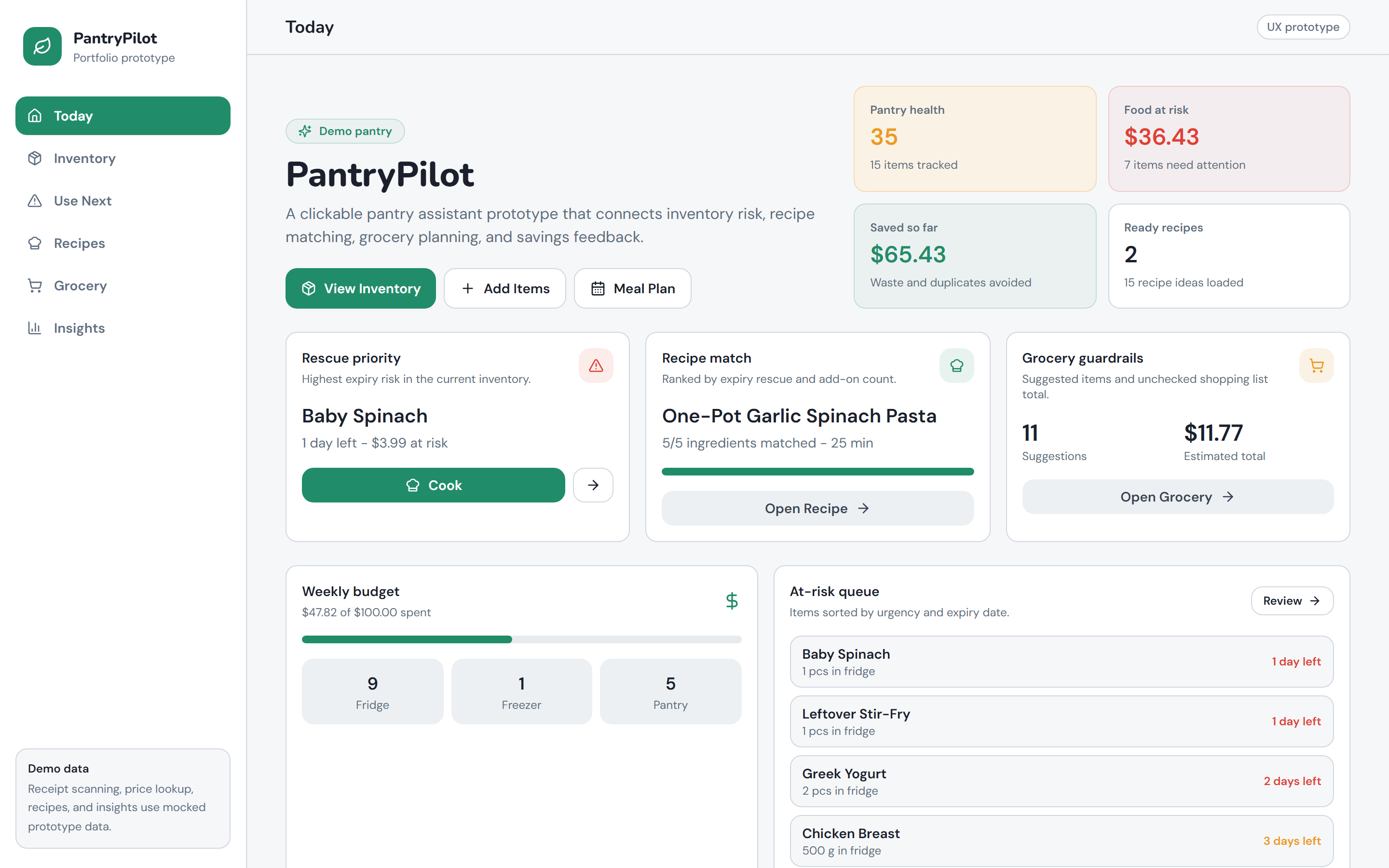
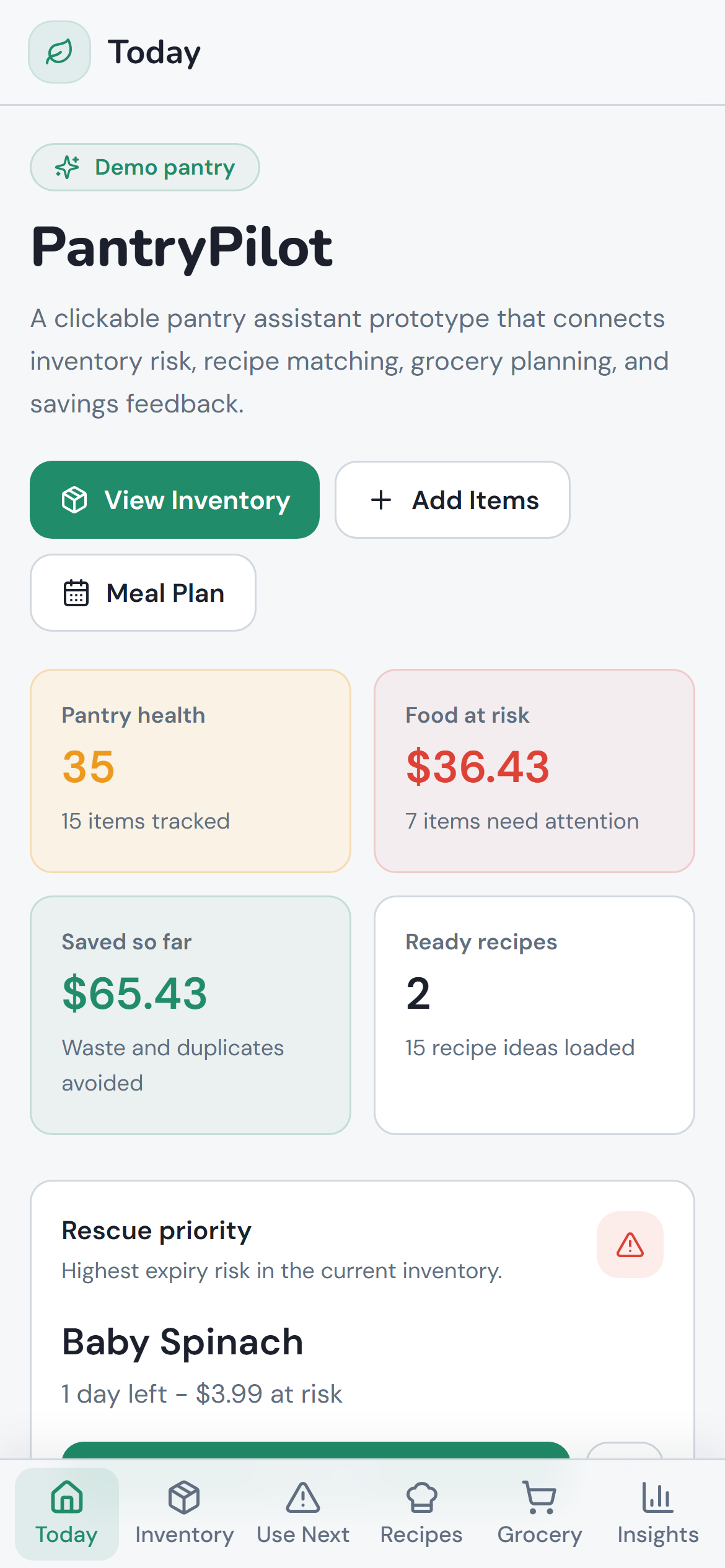
The command center: pantry health score, food-at-risk dollar value, total saved, ready recipe count, weekly budget tracker, a rescue priority card naming the highest-risk item with a direct Cook path, and the full at-risk queue sorted by days remaining. Everything a user needs to know about their pantry in one scroll, oriented around one question: what should I do right now?
feature 02 —
Use-Next: expiry-first triage queue.
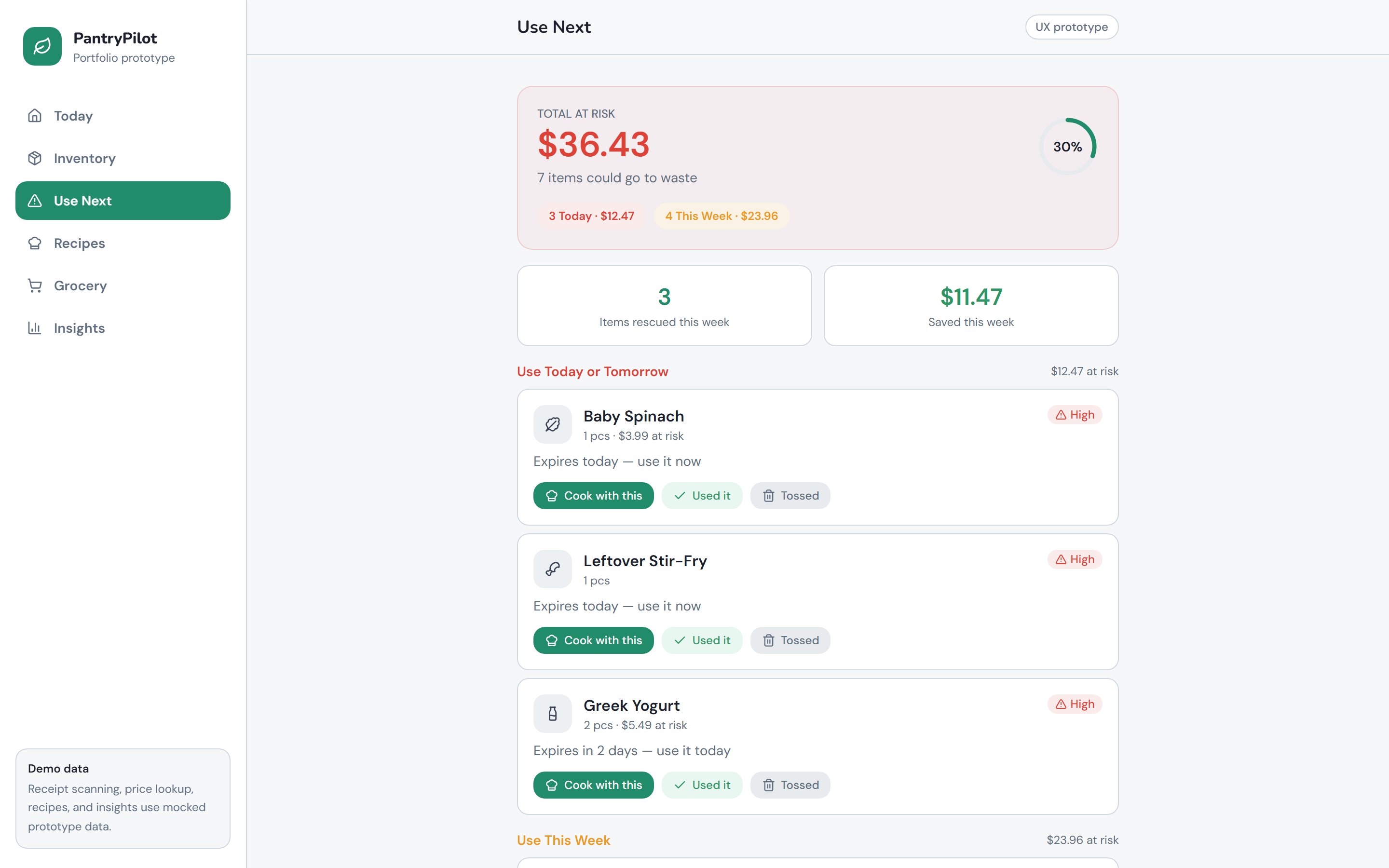
Every item nearing or past its safe-use window, surfaced in one view sorted by urgency. Each row shows days remaining, risk level (High / Medium), and the estimated dollar value at risk. Three inline actions — Cook with this, Used it, Tossed — resolve the item without leaving the view. The total at-risk dollar figure ($36.43 in the demo) sits at the top as the motivating number, broken into "3 Today" and "4 This Week" groupings for prioritization.
feature 03 —
Recipe matching by coverage and expiry risk.
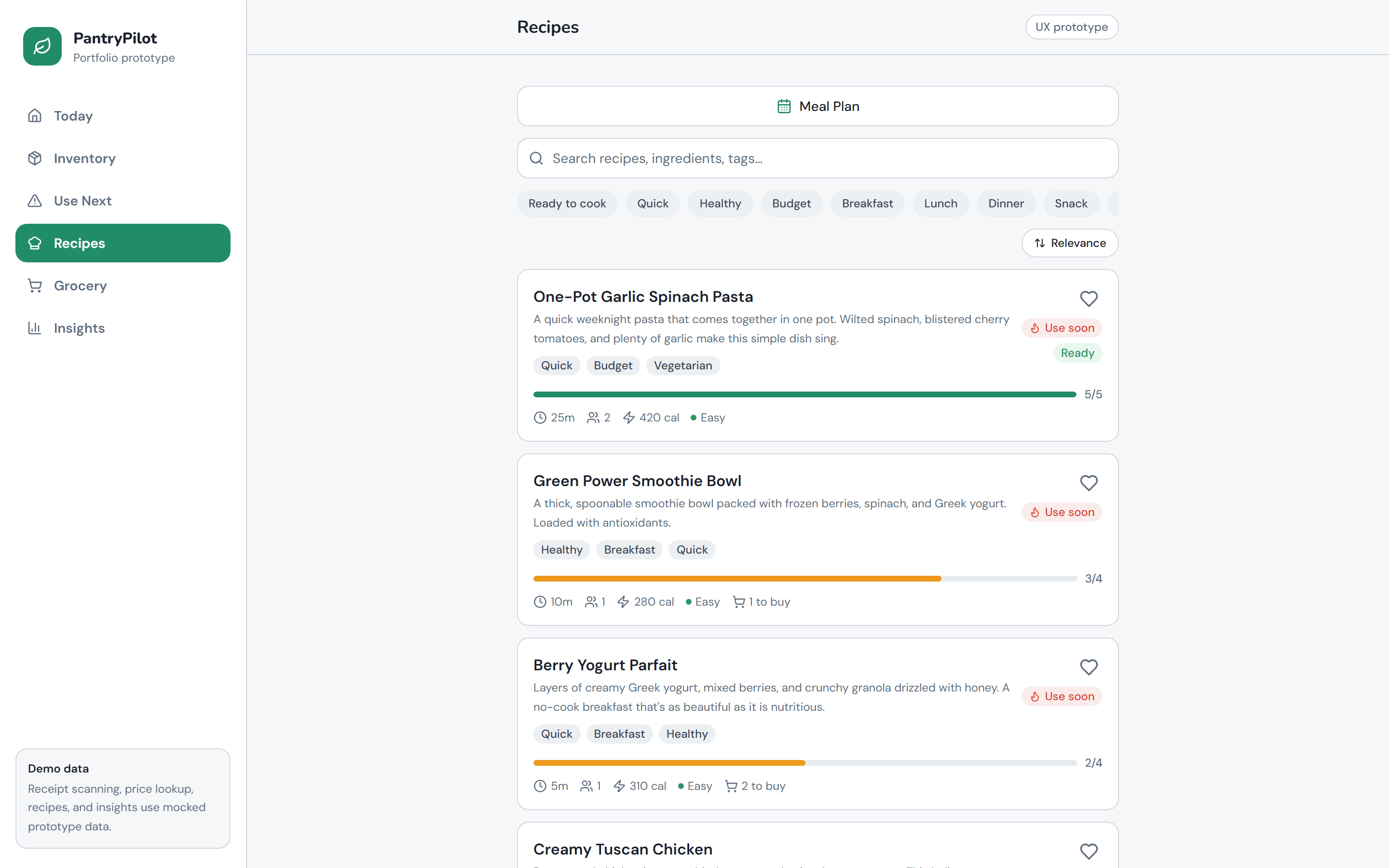
Recipes ranked by the intersection of ingredient coverage and expiry urgency. The coverage bar (5/5 for One-Pot Garlic Spinach Pasta) shows what fraction of ingredients are already in the pantry. The "Use soon" badge flags recipes that consume at-risk items. Filter tabs (Ready to cook, Quick, Healthy, Budget, Breakfast, Dinner) let users narrow further. Ingredient count, cook time, calories, and difficulty are all visible on the card without clicking through.
feature 04 —
Smart grocery suggestions.
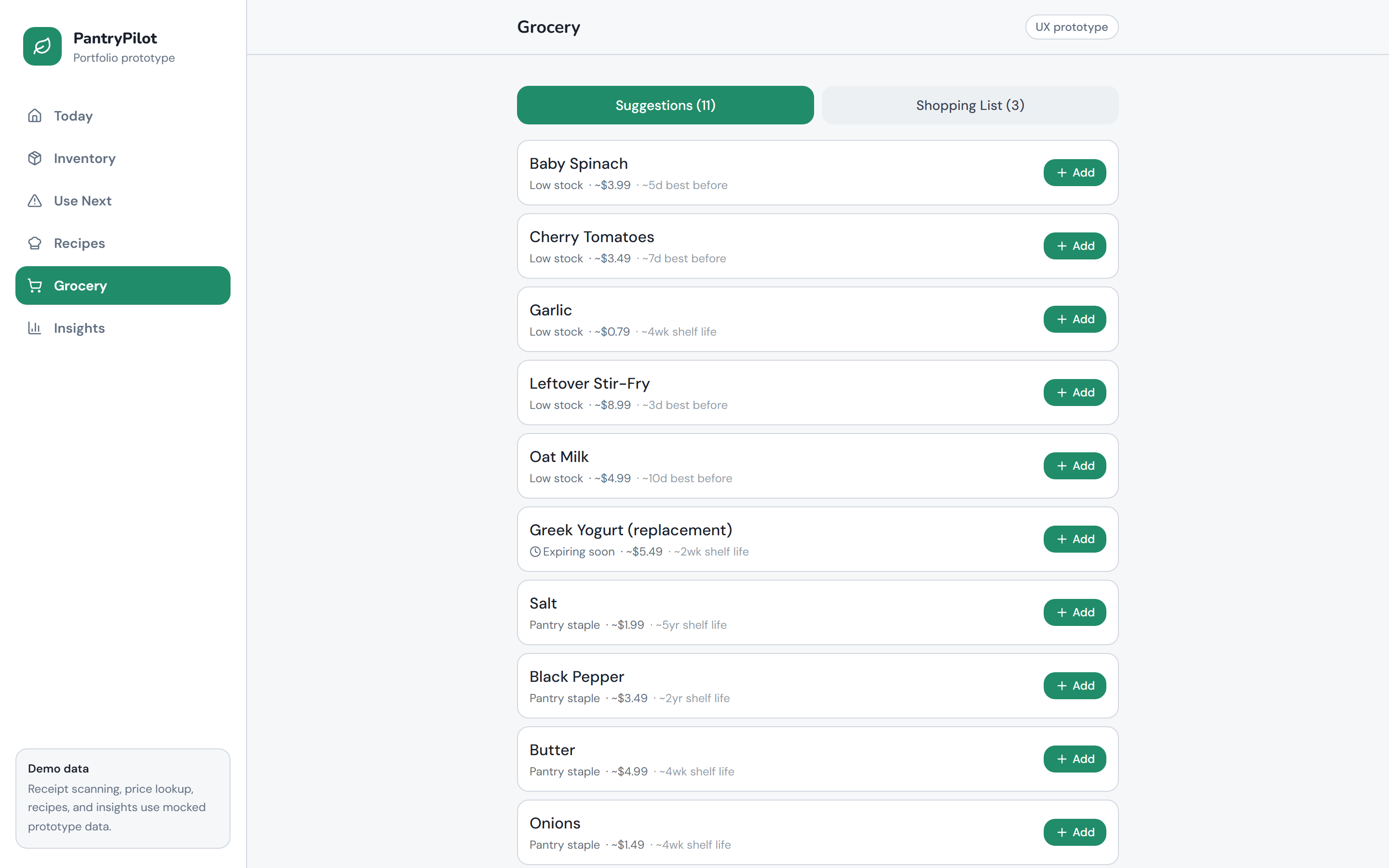
AI-assisted restock recommendations based on three signals: low-quantity items currently in the pantry, ingredients needed to complete near-ready recipes, and pantry staples flagged as running low. Each suggestion shows the estimated price and days of shelf life remaining. Items can be added to a shopping list in one tap, with duplicate warnings when the item is already tracked in inventory.
feature 05 —
Savings and pantry health insights.
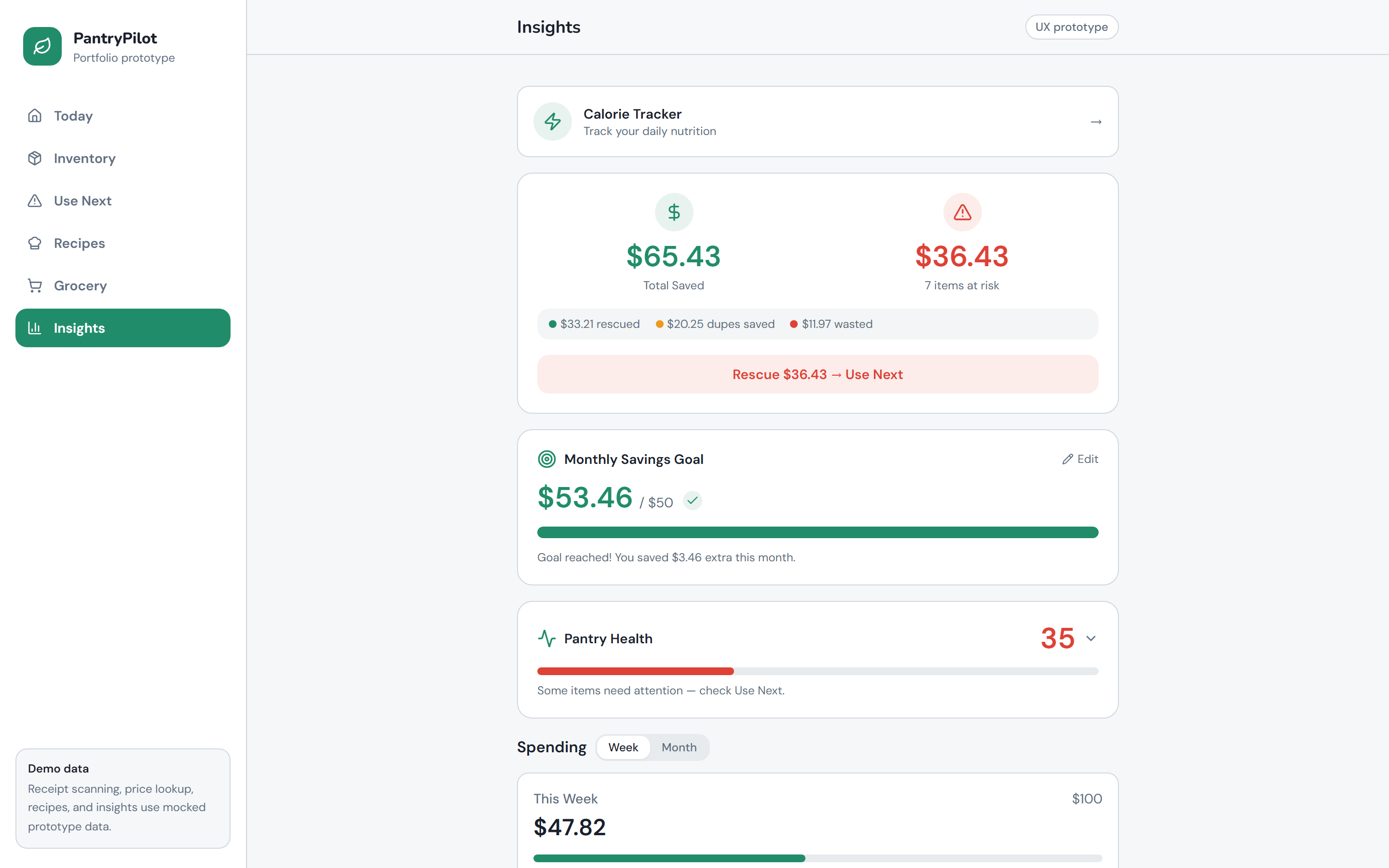
The Insights page closes the feedback loop: total rescued versus wasted, monthly savings goal with progress bar and "goal reached" confirmation, pantry health score (out of 100), and a weekly/monthly spending breakdown. The Rescue CTA at the bottom of the savings card links directly back to the Use-Next queue, connecting the tracking surface to the action surface in one tap.
feature 06 —
Mobile-first layout.
The full PantryPilot flow on a phone: quick-access CTAs (View Inventory, Add Items, Meal Plan) above the fold, pantry health and food-at-risk metrics in a two-column card grid, rescue priority card immediately visible, and a bottom tab bar for Today / Inventory / Use Next / Recipes / Grocery / Insights. No content behind hamburger menus or nested drawers.
chapter 06 —
Tools & technologies.
React 18 + TypeScript + Vite
Frontend application framework. Vite's fast HMR made iterating on the UX prototype rapid; TypeScript enforced data shape consistency across the mock inventory, recipe, and savings models.
Tailwind CSS + shadcn-style UI primitives
Design system. Tailwind utility classes plus shadcn-inspired components for cards, badges, progress bars, and tabs. Consistent use of green as the primary action color reinforces the "fresh / safe" visual language throughout.
Zustand
State management for pantry inventory, recipe list, use-next queue, and savings totals. Minimal API made the mock data layer easy to update — simulating a Cook action is a single store mutation with automatic inventory subtraction.
Recharts + Framer Motion
Recharts powers the savings and spending charts in Insights. Framer Motion handles micro-animations on card entries, use-next item resolution (Cook / Used / Tossed), and page transitions — kept subtle so animation signals state change without slowing the task flow.
Primary research survey (Google Forms)
50-respondent structured survey covering current food management behaviour, prototype usability, and willingness to pay. Both closed-ended (Likert, multiple choice) and open-ended questions, analyzed to validate the core value proposition and surface product improvement priorities.
24-month financial model
Cash flow model with production/sales forecast, freemium conversion assumptions (5% → 6% → 7% across three periods), 4% monthly churn, two-stage funding ($20K founder seed at M1 + $25K angel at M7), and dual valuation (3.5× revenue multiple + 20% discount DCF). Projects $8,895 net income in Year 2 and $959K firm value at Year 5.
chapter 07 —
What the venture proved — and what remains to be validated.
PantryPilot validated the core product hypothesis: users understand and want a unified food management system, find the logging flow easy enough to form a habit, and respond to savings data as a retention mechanism. The 50-person survey confirmed that food planning — not shopping — is where the pain is concentrated. This reoriented the product from an inventory tracker to a decision-support tool, which changed the information hierarchy, the recipe ranking algorithm, and the dashboard design.
The financial model showed a credible path: $45,000 in two-stage funding supports a free-tier soft launch, premium conversion at 5% begins Month 4, and the business reaches cash-flow break-even at Month 17-18 with $8,895 net income in Year 2 as the active paid subscriber base crosses 1,500 users. At $4.99/month, one rescued grocery item per month more than covers the subscription against a $1,300+ annual waste baseline — the value proposition is legible before a user even opens the app.
The honest remaining unknown is retention. Survey return intent is not the same as showing up the following Tuesday when the fridge is full and logging feels like friction. The next validation gate is a multi-week closed beta with real barcode scanning, live pricing, and observed usage data before any marketing spend.
chapter 08 —
Honest caveats.
the honest caveats —
- The prototype uses mock data throughout. Barcode scanning, price lookups, recipe intelligence, and savings calculations are all simulated. Production would require a barcode API, a recipe database with ingredient-to-inventory matching, and a live pricing feed.
- Retention is unvalidated. 62% return intent from a survey is a stated preference, not observed behavior. Multi-week usage testing is needed to confirm whether the logging habit forms and holds after the initial novelty wears off.
- The Insights section tested as "somewhat difficult to understand at first glance" for 60% of respondents. The savings breakdown and pantry health score need clearer labeling and fewer competing data points to reduce cognitive load.
- Price recommendation credibility was mixed: roughly half of respondents found the grocery suggestion pricing credible, but trust dropped when prices could not be verified against real store data. A live pricing feed is a prerequisite before that feature can be monetized.
- 30% of respondents encountered at least one irrelevant recipe recommendation, pointing to the need for user preference personalization (dietary restrictions, time constraints, skill level) before scaling the recipe engine to a production dataset.
- This was a 5-person course project with a semester timeline. A production venture would sequence research, modeling, and building more deliberately rather than running them in parallel under an academic deadline.