Matchify: A Visual System for Music-First Social.
A mobile concept where the visual identity is the product. Dark canvas as the brand floor, one Spotify-aligned green used surgically, profile rings as the universal identity marker, and a content design call that treats every Friend suggestion as a sentence explaining the match. Designed end-to-end in Figma across Spotify-authenticated onboarding, the multi-section home feed, the Friends discovery surface, and the Events tab. Selected for ARIA 2024, the University of Toronto's annual research and innovation showcase.
5
designed surfaces
1
dark canvas
1
brand green
ARIA '24
UofT showcase
Skills used
chapter 01 —
The visual language.
Matchify is a music-first social network designed around three commitments: a dark canvas that lets album art, concert photography, and profile photos carry the visual energy; a single Spotify-aligned green used only for brand moments and primary CTAs so it never collapses into wallpaper; and a content design call that treats every Friend suggestion as a sentence ("Shared interest in EDM with favorite tracks by top DJs") rather than a percentage similarity score. The full prototype covers Spotify-authenticated onboarding, the multi-section home feed, the match-reason Friends discovery surface, and an Events tab that overlays attending-friends avatars onto concert cards.
chapter 02 —
Why the visual identity does the heavy lifting.
Most music-social products lead with photos and personality and use music data as a secondary filter. Matchify inverts the priority. The dark canvas removes the daytime-app feeling and signals the product belongs in the same context users actually listen in: commutes, concerts, late-night sessions. The Spotify-green accent does brand recognition work that words and logos would otherwise have to do. The profile-ring treatment turns every avatar into a Matchify object, which is what binds four otherwise unrelated surfaces (splash, home, Friends, Events) into one product visually.
chapter 03 —
Product decisions.
The decisions behind the work and the reasoning for each.
Dark canvas as the brand floor.
Light mode would have made Matchify look like every other social network. Dark mode is functional too: album art, concert photography, and profile photos all sit better on dark backgrounds. The decision was not "add dark mode," it was "design only for dark, then decide later whether a light theme is worth the engineering cost." Every other visual call (type weight, color saturation, ring contrast) is downstream of this one.
Restrained brand palette —
One green, used surgically.
Matchify green is the most expensive color in the system because it does brand recognition work that text and logo would otherwise have to do. The discipline: green is reserved for the wordmark, the Matchify logomark inside the green badge, primary CTAs ("Continue With Spotify", "Next"), tab-active states, and the profile-ring identity marker. Everything else (section headers, body, secondary CTAs like "Request") is monochrome or a deliberately different blue. Using green everywhere would have made the product feel like a Spotify clone.
Profile rings as universal identity.
Every Matchify avatar (Friends Listening cards, the nav profile chip, attending-friends overlays on event cards, the Create Profile upload state) is wrapped in a green ring. The ring is small visually but it does load-bearing work: it tells the user "this is a Matchify profile" before they read the name. Without the ring, profile photos lose their product association and start looking like generic stock images. The ring is the atom of the visual system.
Match reason as content, not metadata.
The most expensive single design call. Every Friend suggestion explains itself in one sentence: "Shared interest in EDM with favorite tracks by top DJs." "Similar Indie Rock playlists with favorites like Mr. Brightside." "Attended the same Imagine Dragons concert in June '24." Stating the match reason in plain language replaces the percentage-match number most social apps use, and the gain is doubled: the reason is also a conversation starter, so the suggestion answers "why" before the user even has to ask.
Layout-by-content-type, not by IA convention.
Three layout patterns sit in the home feed: horizontal carousels for discovery surfaces (Friends Listening, Friends' Playlists, Events in Toronto), a vertical list for activity (Friends Activity), and stacked cards for the main canvas (Events tab). The IA picks layout based on what the content wants the user to do, not on a convention. Horizontal swiping says "browse." Vertical scroll says "catch up." Stacked cards say "commit." Three signals in one screen without making the screen feel busy.
Four tabs. No kebab menus. No fifth tab.
Home / Events / Friends / Messages. Everything that does not fit into those four got cut from the surface and pushed inside the relevant tab. Settings, profile detail, search, filters: all live inside one of the four tabs, not in an overflow menu or a hamburger drawer. Four tabs is the smallest IA that still supports a credible music-social product, and it is the largest IA the user can hold in working memory while listening to music.
chapter 04 —
Design system.
The actual kit behind the screens: five colors, five type roles, six reusable components. Everything in the prototype is built from this kit, and most of the visual discipline comes from refusing to add to it.
palette —
Canvas
#1A1D21
The dark floor on every screen. Sets the brand mood and lets photography and album art carry the color.
Matchify green
#1DB954
Brand mark, primary CTAs, tab-active state, profile ring. Used surgically so it never collapses into wallpaper.
Social blue
#1B95E0
Secondary social actions only. The Request button on Friends cards lives here so it does not compete with the green primary CTAs.
On-canvas white
#FFFFFF
Display headers, body copy, and card titles. The contrast workhorse against the dark canvas.
Soft gray
#B0B3B8
Secondary text, captions, inactive tab labels, search placeholder copy. Drops below white to create reading hierarchy without adding color.
typography —
Display
Sans 700 / 32-36px / Matchify green
Home
Section heading
Sans 700 / 18-20px / white
Your Friends' Playlists
Card title
Sans 600 / 16px / white
Mei Wang
Body
Sans 400 / 14px / soft gray
Shared interest in EDM with favorite tracks by top DJs.
Caption
Sans 500 / 12px / soft gray
September 10, 2024 · Toronto
components —
Profile ring
A two-pixel green ring around every avatar. The smallest reusable element in the system, and the one that brands a photo as a Matchify profile across every surface.
Card
Dark surface, rounded corners, 16px interior padding. Used for friend suggestions, friends-listening tiles, playlists, and event cards. One container shape for the whole product.
Primary CTA
Full-width pill button in Matchify green with a white sans-700 label. Reserved for Continue With Spotify, Next, and other forward-motion actions.
Secondary CTA
Pill button in social blue with a white label. Used only for Request and similar social actions so they stay distinct from forward-motion primaries.
Section header
Sans 700 white text, left-aligned, with horizontal-scroll content directly below. The pattern that organizes the dense home feed into readable sections.
Bottom nav (four-tab)
Icon plus label per tab, green active state, never more than four entries. The structural commitment that keeps the IA readable at a glance.
chapter 05 —
Key findings.
1 canvas
Dark mode is the brand floor
Designing for dark first changed every other call: album art reads warmer, type weight needs to step down, and accent colors carry twice the visual weight they would in light mode. The brand could not have read this confident in light mode without a much louder palette.
1 green
One color does the recognition work
Matchify green only appears on brand moments and primary CTAs. Everywhere else is monochrome or a deliberately different blue for social actions. The constraint is what makes the green register as identity instead of decoration. Using it everywhere would have collapsed it into background noise.
"why"
Match reason as content, not metadata
Stating the match reason in a sentence ("Shared interest in EDM with favorite tracks by top DJs") replaces percentage-match noise and turns the suggestion into a conversation starter on the same screen. The reason does double duty: it explains the match and it gives the user something to say.
4 tabs
Bottom-nav IA, no escapes
Resisting a fifth tab was the brand decision that kept the surface readable. Home, Events, Friends, Messages. Everything else lives inside one of those four. The IA fits inside the visual scan a user does in the first second of opening the app.
chapter 06 —
Key features.
The signature product moments. Each one is a complete scenario the prototype demonstrates end to end.
feature 01 —
Splash: the brand thesis in 200 pixels.
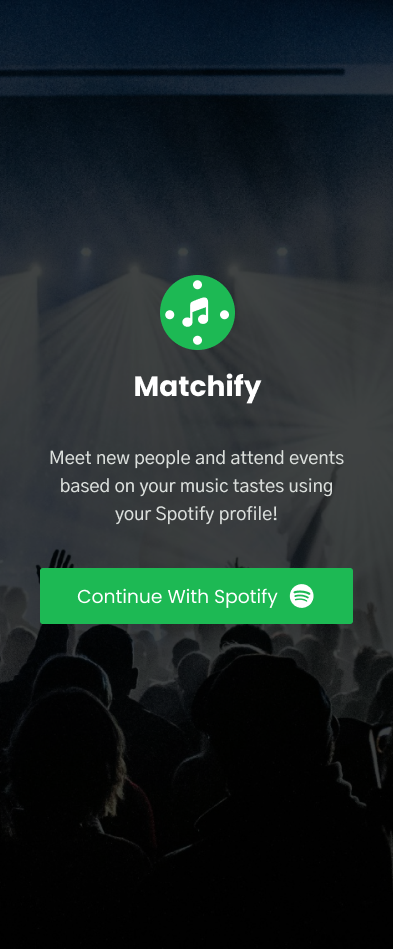
Dark concert backdrop with stage lights, the green Matchify logomark with music notes inside, the white Matchify wordmark, and a one-sentence pitch ("Meet new people and attend events based on your music tastes using your Spotify profile!"). The "Continue With Spotify" CTA borrows Spotify's own green so the OAuth handoff feels native, not third-party.
feature 02 —
Create Profile: inherit the environment.
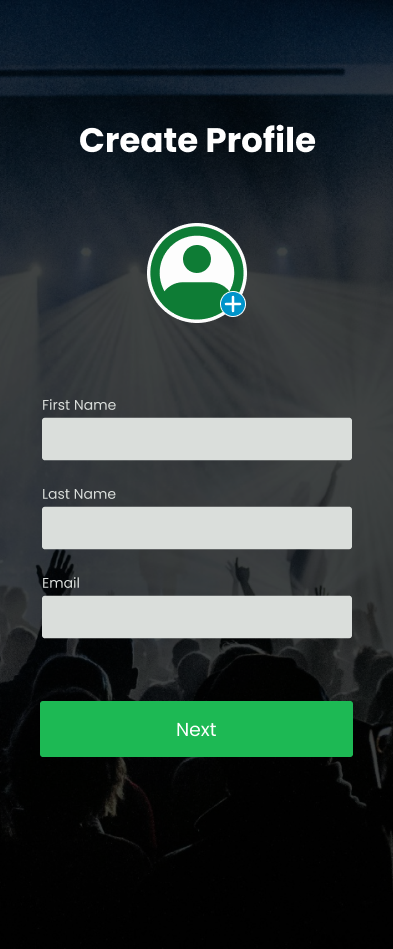
The same dark concert backdrop, the same green primary CTA, and a focused form: profile picture upload (a green plus sign inside the profile ring), First Name, Last Name, Email. Three fields plus an avatar. The Next button is full-width so the path forward is the most prominent element on screen.
feature 03 —
Home: a dense multi-section dark feed.
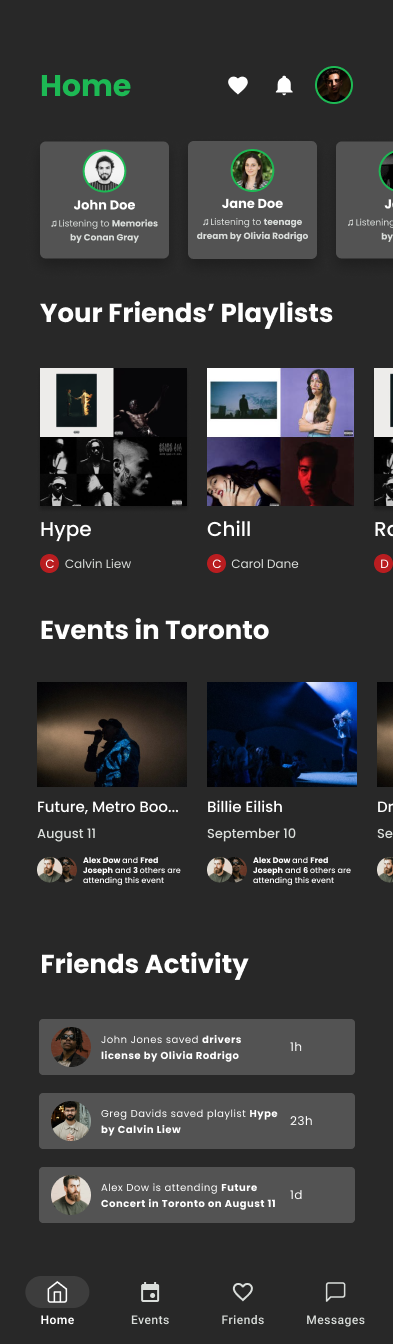
Four sections stacked into one canvas. Friends Listening (horizontal scroll, currently-playing track names under each friend), Your Friends' Playlists (horizontal scroll, playlist-mosaic art with curator credit), Events in Toronto (horizontal cards, attending-friends avatar stack), and Friends Activity (vertical list of social events: saved a track, saved a playlist, attending a show). Bottom nav anchors the surface.
feature 04 —
Friends: match reason as the content.
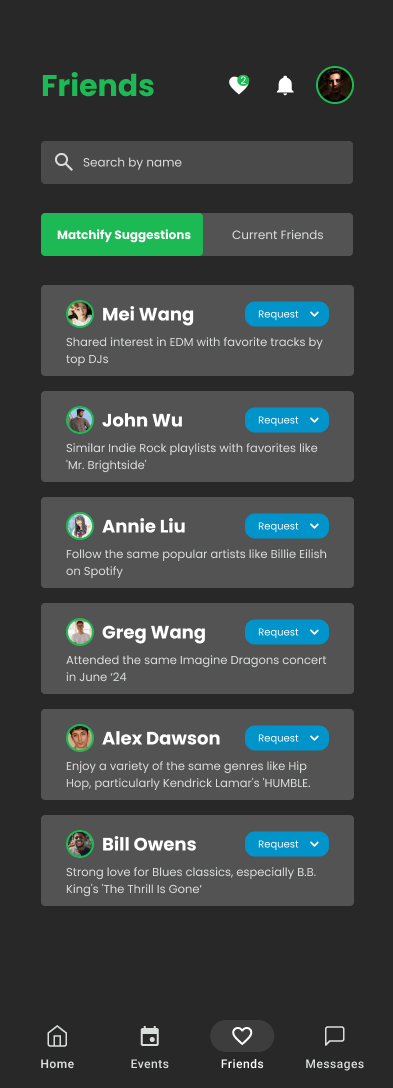
Tab toggle (Matchify Suggestions / Current Friends), a search field, and a vertical list of suggestion cards. Each card shows the friend's photo (with the green ring), their name, and a one-sentence match reason. Blue Request CTAs sit deliberately outside the green system as a secondary color for social actions.
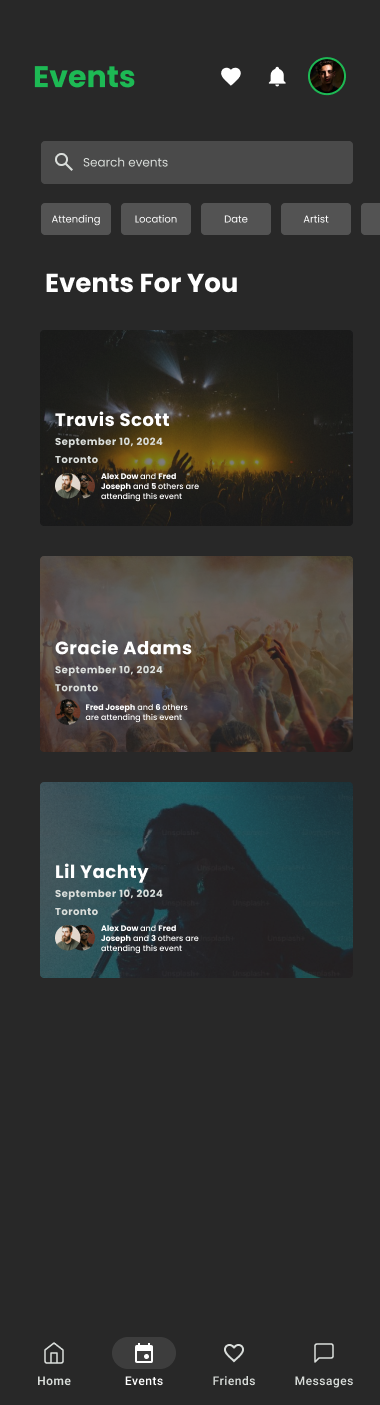
feature 05 —
Events: social proof inside the card.
Search field plus filter chips (Attending, Location, Date, Artist), then a vertical stack of concert cards (Travis Scott, Gracie Adams, Lil Yachty). Each card uses artist art as the background, lays the date and city over the bottom, and ends with a tiny "X and Y others are attending this event" overlay showing friends going.
feature 06 —
The visual atom: profile ring + brand green.
Every avatar in the product is wrapped in a green ring. Friends Listening cards, Friends Activity feed, attending-friends overlays on event cards, the nav profile chip, the Create Profile upload state. The ring is the smallest piece of the visual system and it appears on every screen except the splash.
chapter 07 —
Explore the design file.
The Figma file the screens were exported from. Zoom and pan around the canvas to see component variants, the dark-mode color tokens, and the layout grids behind each screen.
Hosted by Figma. If the embed shows a sign-in prompt, the file is private — open the link below to view in a new tab.
chapter 08 —
Tools & technologies.
Figma
Screen design, component library, prototype linking. Dark-first style sheet (color tokens, type ramp, ring component, card components for friends-listening, playlists, events) with light-mode never designed because dark was the brand floor.
Spotify Web API
OAuth, top artists, top tracks, listening history, and playlist metadata. The data shape drove which screens existed at all: Friends Listening, Friends' Playlists, and the match-reason copy all assume the API returns rich enough listening data per user.
Dark-first design fundamentals
Lowered type weights for body, raised contrast on accents, increased card padding versus a light-mode equivalent, and re-balanced photography (concert images, album art) so they read correctly on near-black canvases without washing out.
Mobile design conventions
Four-tab bottom nav (iOS / Android convention), horizontal carousels for browse intent, vertical lists for feed intent, full-width primary CTAs at the bottom of forms. Conventions used where they help comprehension, broken where they would have hurt the brand.
chapter 09 —
What the project argues from a visual-design angle.
Matchify's thesis is structural: the visual identity is the product. The brand green, the dark canvas, the profile ring, and the match-reason copy together do work that a percentage match or a profile-only feed could not. Without those four moves, the app would be a worse version of a dozen products that already exist. With them, it has a position no other music-social product currently occupies.
Selection for ARIA 2024 validated that the framing held up against research-led projects across disciplines. The interesting thing was that the visual choices were treated as the thesis, not the dressing. The dark canvas was a brand decision, not an aesthetic preference, and the match-reason copy was a content-design call, not a UX writing afterthought.
For my own design instincts, this is the project that taught me that the cheapest-looking element in a system (a two-pixel ring around an avatar) is often the most expensive to get right, and that brand discipline (one color, one canvas, one IA) is what produces a product that reads confident at a glance.
chapter 10 —
What this visual system is, and what it isn't.
the honest caveats —
- High-fidelity Figma prototype, not a shipped iOS or Android app. The component library is implicit (visible in the file, not exported as production design tokens or a code library).
- Only dark mode designed. A real ship would need a light theme, accessibility-mode high-contrast variants, and a documented decision rule about when each is used.
- Spotify dependency is a visual-system dependency, not just a data one. Matchify green sits next to Spotify green; the OAuth CTA borrows Spotify's pattern. If the integration changed, the visual system would have to be re-justified.
- Motion and micro-interactions are implied (cards swipe, tabs animate, the avatar ring pulses on now-playing) but not specified frame-by-frame. A production build would need Lottie files or platform-native motion specs.
- Match-reason copy is hand-written examples in the prototype. A production version would need a generation system (rules + LLM + style guide) that can produce that voice at scale across millions of suggestion cards without sounding mechanical.
- Empty states, error states, loading skeletons, and onboarding edge cases (no friends yet, no Spotify history, denied permissions) are out of scope. The prototype assumes the happy path.